
Google Business Profile posts are short updates that appear on your profile in Search and Maps. There are three types: Update, Offer and Event. Each can carry a photo or video, and Updates and Events can carry a button such as Book or Call now. Google archives posts after six months unless you set a date range. One good post a week is plenty for most businesses.
Google Business Profile posts are the closest thing your profile has to a shop window that you control. Reviews are written by customers. Photos are often added by strangers. Posts are the one part where you choose exactly what people see, in your own words, with a button that sends them where you want.
Most businesses either never post or post the same “We’re open! Call us today!” every week until they get bored and stop. This guide covers the three post types, where they show up, real examples you can adapt for your own trade, and the reasons posts get rejected.
Where Google Business Profile posts show up
Posts appear in different places depending on the device. Google lists them on its help page for creating posts:
- On a phone, in the Updates or Overview tab of your profile, in both Search and Maps.
- On a computer, in the From the owner section of your profile, in both Search and Maps.
- As featured posts on mobile for some food and drink businesses. For now that is limited to English language, single location businesses in the US, UK, Canada, Australia and New Zealand.
Only posts with the status Live are shown. A post can also sit at Pending while Google checks it, or come back as Not approved if it breaks a rule. More on that below.
The three post types
Pick the type based on what you want the reader to do, not on what looks nicest. Each type has different required fields.
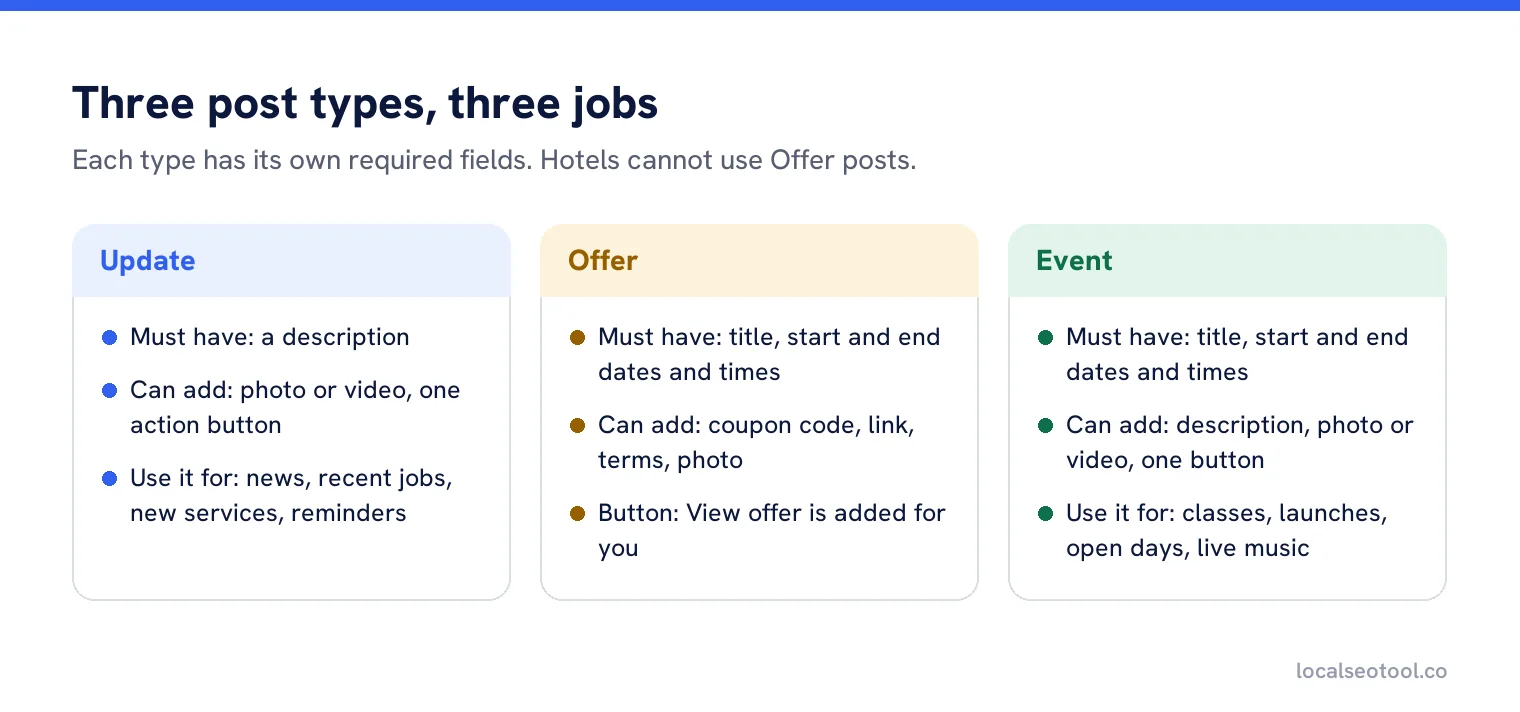
| Type | Must have | Can also have | Button |
|---|---|---|---|
| Update | A description | Photo or video, action button with a link | Your choice |
| Offer | A title, start and end dates and times | Description, photo or video, coupon code, link, terms | View offer, added automatically |
| Event | A title, start and end dates and times | Description, photo or video, action button | Your choice |
Hotels are the exception. Google’s posts content policy says hotels can create posts but not Offer posts, and not any post that mentions deals, promotions or discounts.
The button options
Update and Event posts let you add one action button. The options are Book, Order online, Buy, Learn more, Sign up and Call now. The first five send people to a web link you choose. Call now uses the verified phone number on your profile, so there’s no link to add.
Pick the button that matches the next real step. A restaurant posting a new menu wants Order online, not Learn more. A dentist posting about a new hygienist wants Book. Learn more is the safe choice when nothing else fits, but it’s also the weakest, because it doesn’t tell the reader what happens when they tap it.
What a good post looks like
Before the examples, here is how the parts of a post work together. Readers see the photo first, then the first line or two of text, then the button. Everything else is hidden until they tap.
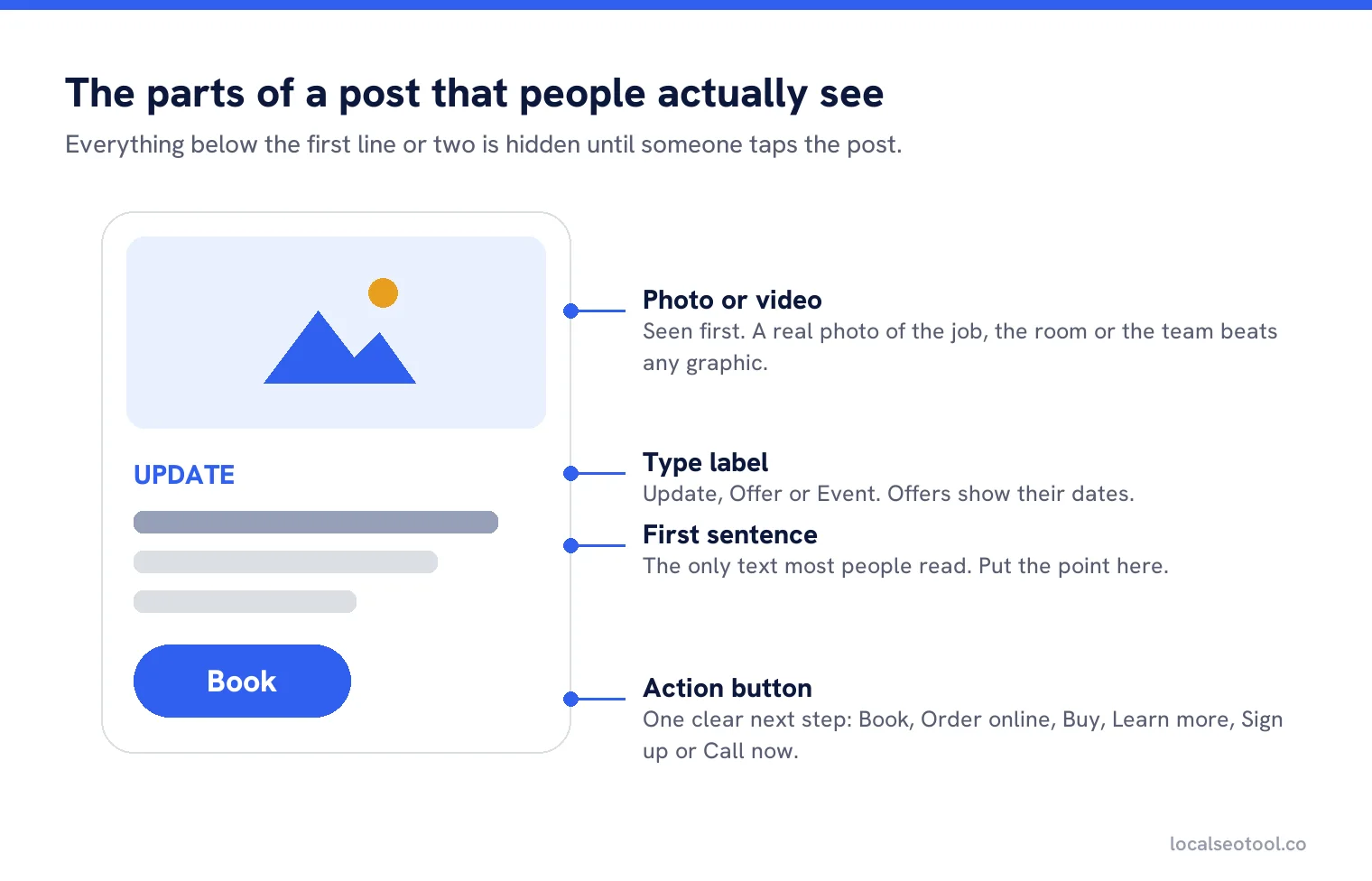
Google doesn’t publish a character limit on its help page. Posting tools commonly work to 1,500 characters. In practice, you rarely need more than three short sentences. The preview cuts the text after a line or two, so the point of the post has to be in the first sentence. “Free brake check this month” beats “At Smith’s Garage, we care about your safety on the road”.
Google Business Profile post examples you can adapt
These are written for different trades. Swap in your own details. Each one says one thing, gives a reason to act now, and ends on a single button.
Plumber
UpdateBoiler service slots for October are now open. A yearly service keeps your warranty valid and catches problems before the cold weather does. Book online in under a minute.
Button: Book. Photo: an engineer at work on a boiler.
Restaurant
EventLive jazz every Thursday in November, 7pm to 10pm. No cover charge. Tables near the band go first, so book ahead.
Button: Book. Dates: each Thursday in the month. Photo: last week’s band, taken from a table.
Hair salon
OfferMid-week colour: 20% off any colour appointment Tuesday to Thursday this month. Mention the offer when you book.
Title: 20% off mid-week colour. Dates: first to last day of the month. Terms: one per customer, not with other offers.
Accountant
UpdateSelf assessment tax returns are due on 31 January. If you haven’t sent us your paperwork yet, upload it this week and we’ll file it in good time.
Button: Learn more, linking to the upload page. Photo: a real photo of your office or team, not a stock calculator.
Roofer
UpdateFinished today: a full slate re-roof on a 1930s semi in Headingley. Old slates removed, new membrane and battens, original ridge tiles reused. Free quotes within 48 hours.
Button: Call now. Photo: before and after, side by side, from the same angle.
Gym
EventBeginner strength class, Saturdays at 9am from 4 November. Six weeks, small group, coach included. No experience needed.
Button: Sign up. Photo: a real class in your gym.
Physiotherapist
UpdateWe now offer sports massage on Monday and Wednesday evenings, with appointments until 8pm for people who can’t get away from work.
Button: Book. Photo: the treatment room.
Florist
OfferOrder Valentine’s flowers by 7 February and get free delivery anywhere in the city. After that, delivery slots fill up fast.
Title: Free Valentine’s delivery. Dates: today to 7 February. Coupon code optional.
Notice what is missing. None of them say “we are the best”, none of them stack five services into one post, and none of them include a phone number in the text. That last one matters, as the next section explains.
Why posts get rejected
A rejected post shows as Not approved and never goes live. These are the usual reasons, taken from Google’s help page and its content policy.
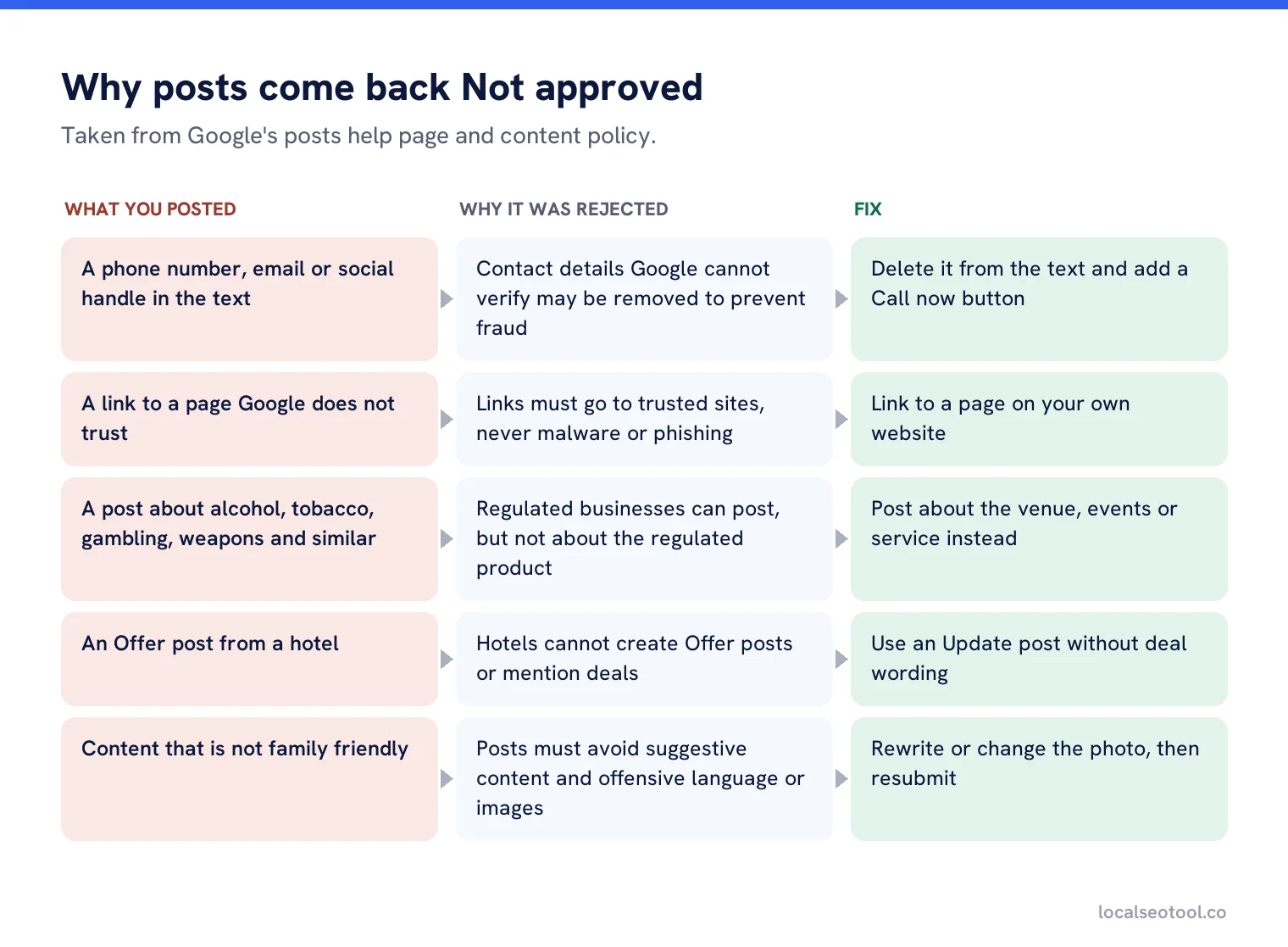
The phone number rule catches a lot of people. Google says posts with contact details that it can’t verify, such as a phone number, email address or social media handle, may be removed to stop fraud. Use the Call now button instead. It dials the verified number on your profile, so it’s both allowed and easier for the customer.
How often to post
Once a week is a good rhythm for most single location businesses. It keeps the profile looking current without turning into a chore. Posting every day adds little, because people rarely scroll back through more than the latest few.
Remember the six-month rule. Google archives posts older than six months unless you set a date range. Archived posts don’t disappear from your account, but they stop showing to customers. A profile whose newest post is from last spring looks closed.
The easiest way to keep going is to write a month of posts in one sitting and have them go out on set days. Our post scheduler does that, and auto post and dripfeed publishes from a pool of posts on a rhythm you set, so a busy month doesn’t leave the profile silent. For photos on their own, the media scheduler works the same way.
Do posts help you rank?
Honestly, the evidence is thin. Google’s own page on improving local ranking talks about complete information, verification, hours, reviews and photos. It does not single out posts.
Posts earn their place in a different way. They change what a customer sees when they compare you with the two businesses next to you in the map results. A current offer, a recent job photo or a dated event is a reason to pick you that the other two may not have. Treat posts as a way to win the click, not as a way to climb the list. For the work that does move rankings, read our guide to optimising your profile field by field.
Posting for more than one location
Each location’s profile has its own posts. A chain that posts only on its head office profile leaves every branch silent. The usual pattern that works is one shared post each month from head office, adjusted for each branch, plus one local post written by the branch itself.
The local post is the one that does the work, because it’s specific: the new team member, the event in that town, the job finished on that street. If you’re managing dozens of profiles, our guide to automating profile updates across locations compares the tools, and multi-location management puts every branch’s posts, reviews and edits in one place.
Write a month of posts in one sitting
Schedule posts and photos for every location, and keep the queue full when you’re busy. Three day free trial.
Frequently asked questions
How long do Google Business Profile posts stay up?
Google archives posts that are older than six months unless you set a date range. Offer and Event posts with dates stay relevant for their date range.
Can I put my phone number in a post?
It is better not to. Google may reject posts that contain contact details it cannot verify. Add a Call now button instead, which dials the verified number on your profile.
Do posts help my Google Maps ranking?
Google does not name posts as a ranking factor. Their real value is in helping a customer choose you once they can see you, by showing a current offer, event or recent job.
How often should I post on my Business Profile?
Once a week is enough for most single location businesses. The key is to never let the newest post get old, because an archived or stale post makes the profile look neglected.
Why does my post say Not approved?
The post broke a Google rule, often an unverified phone number, a link to an untrusted site, or content about a regulated product. Edit the post to remove the problem and submit it again.
Sources
The Google documentation behind the guidance on this page. Google changes these pages without notice, so check the date on any figure before you rely on it.