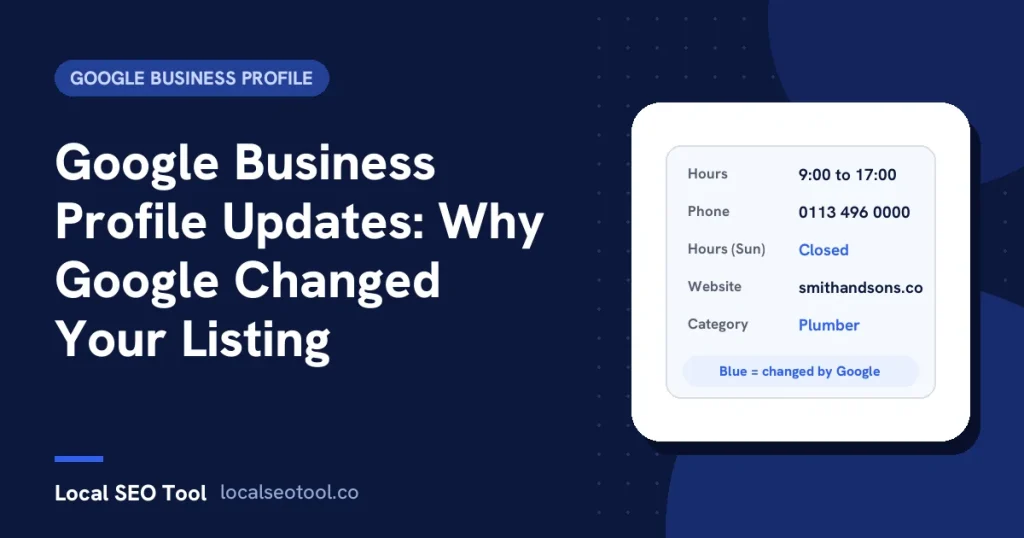

Google business profile updates are changes Google makes to your listing using other sources, such as edits suggested by the public, licensed data and your own website. They show as blue text in your profile editor, with a notice at the top of the page. You have four days to accept or reject a suggested edit that needs your review. If you don’t respond, Google may publish it when other public information backs it up.
You open your profile and something is different. The hours have changed, the website link points somewhere odd, or the category is one you never picked. Nobody on your team touched it. That’s a Google update, and it is one of the most confusing parts of running a Business Profile.
This guide explains where these changes come from, how to spot them, how to undo the wrong ones, and how to stop Google putting them back a week later. Everything about Google’s process comes from its help page on Google updates on your Business Profile.
What a Google update actually is
Your profile doesn’t belong to you alone. Google treats it as a shared record of a real place, and it takes information from several sources to keep that record right. Google names user reports and licensed content as examples. If those sources say something on your profile is wrong or out of date, Google may change it.
There are two kinds of change, and they work a little differently:
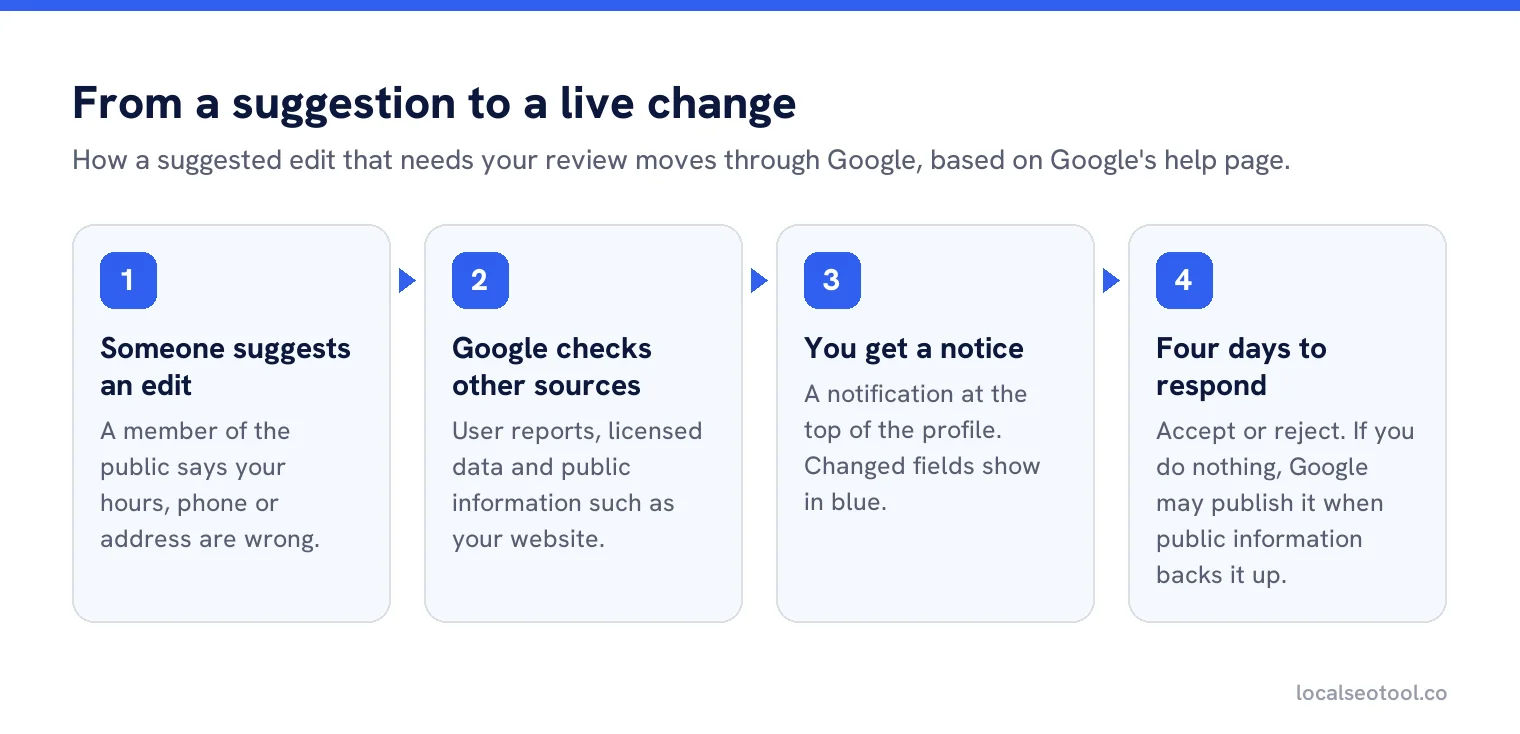
- Suggested edits come from members of the public. Anyone with a Google account can suggest that your hours, phone number or address are wrong. Some of these need your review before they go live.
- Google updates come from Google’s own checks against other sources. Google says it may apply some changes without asking you first, when that is needed to meet its policies.
Neither is a sign you’ve done something wrong. They are routine. The problem is only when a wrong change goes live and stays live because nobody noticed.
How to spot a Google update
Google gives you three signals. Learn to look for all three, because the notice is easy to miss.
A notice at the top of the profile
When there are Google updates waiting, a notification appears at the top of your profile page in the editor.
Blue text in the editor
Inside the profile editor, information that Google has changed shows in blue. Information that Google hasn’t touched shows in black, or white if you use dark mode.
What customers see
The editor shows what Google holds. Customers see what Google publishes. Open your listing in Google Maps in a private browser window, signed out, once a week. That’s the only way to see exactly what a stranger sees.
The four day window
This is the detail that catches most owners out. When a suggested edit needs your review, Google gives you four days to accept or reject it. If you don’t respond, Google may publish the change anyway, provided other public information supports it. Google’s example of that other information is your business website.
Four days is short. A business owner on holiday for a week can come back to changed hours that have been live for three days. Give a second person manager access to the profile, and have someone check it at least twice a week.
How to review and undo a Google update
Open the profile editor
Sign in at business.google.com with an owner or manager account and open the profile. Look for the notice at the top.
Compare each blue field with the truth
Some updates are right. A customer may have spotted that your Sunday hours changed and you forgot to update them. Accept those. Don’t reject a change just because you didn’t make it.
Reject or correct the wrong ones
For suggested edits, accept or reject each one. For anything else that’s wrong, edit the field directly with the correct information. Google says edits are usually reviewed within 10 minutes, but can take up to 30 days, according to its page on what happens to your edits.
Check the live listing a few days later
Open Maps signed out and confirm the correct details are showing. If Google changed it back, the cause is somewhere else, which is the next section.
Why Google keeps changing it back
If you correct a field and Google changes it again a week later, Google is seeing something online that disagrees with you. Remember the rule: Google may publish a change when other public information supports it. So the fix is not in the profile. It’s in the other public information.
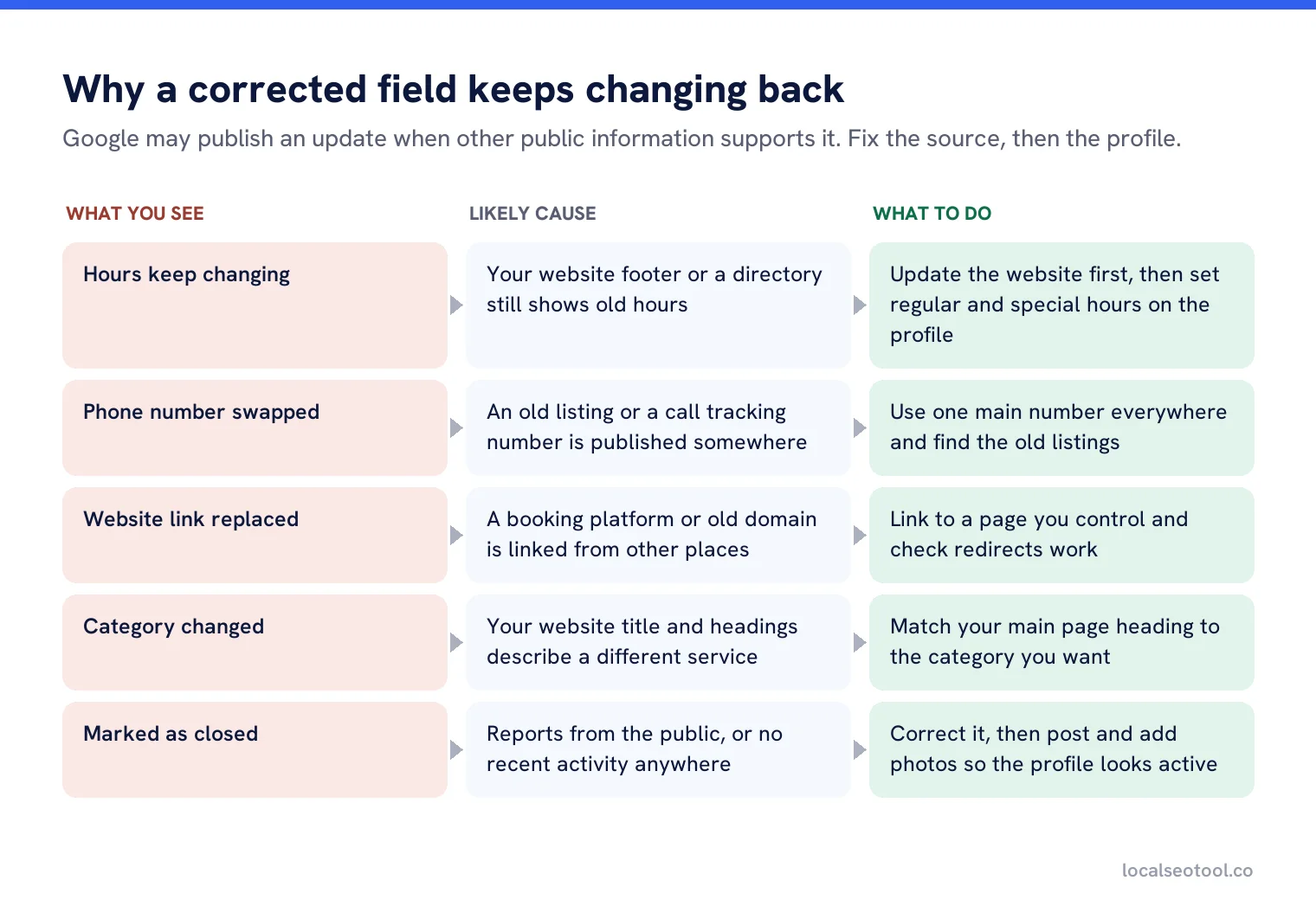
Very often the disagreement comes from your own website. If your contact page still lists the old phone number, or the footer shows last year’s opening hours, Google has a public source that backs up the wrong version. Fix the website first, then the profile.
Another common source is old directory listings. A citation site that still shows your previous address keeps feeding that address back into the system. Our guide to citations and NAP consistency explains how to find and fix them, and the citation checklist lists the directories worth checking first.
The fields to watch most closely
Every field can change, but these are the ones where a wrong update costs you the most, because they decide whether a customer can reach you at all.
| Field | What a wrong update does | How to protect it |
|---|---|---|
| Hours | Customers arrive to a locked door, or don’t come when you’re open | Set special hours before every holiday so nobody has a reason to suggest a change |
| Phone number | Calls go to an old number or a competitor | Use the same number on the profile, website and every listing |
| Website link | Clicks go to a dead page or a booking site you don’t use | Link to your own home page or a page you control, not a third party |
| Category | You stop appearing for your main service | Pick the category that matches your website’s main heading and title |
| Address and pin | Directions send people to the wrong street | Check the pin on the map after any update, not just the address text |
| Open or closed status | You show as closed and stop appearing in results | Check weekly. Our guide to why a business is not showing on Maps covers recovery |
What not to do
Don’t make a second profile to get around a change you don’t like. Two listings for one business breaks Google’s guidelines, splits your reviews and is a common route to suspension. If a duplicate already exists, merge it instead.
Don’t set up software to undo every Google change automatically, either. Google’s Business Profile API policies say plainly that the APIs may not be used to automatically revert changes made by Google. A tool that does it can lose its access, and your account with it.
The right setup is a tool that alerts a person when something changes, so a human can decide. That’s what our profile protection feature does. It stores the values you approved for each location, watches the fields that cost you money when they’re wrong, and alerts you when a public edit or a Google update changes one. A person then decides whether to put it back.
Google updates across many locations
With ten or more locations, the chance that one of them has a wrong update live right now is high, simply because there are more profiles to change. Three habits help.
- One person owns the check. If everyone is responsible for watching for updates, nobody does it.
- Fix the store locator first. For chains, the store locator page on your website is a public source Google can check against. If it’s wrong, every profile can drift toward the wrong data.
- Be careful with bulk uploads. Google says that in a bulk upload, unchanged fields are ignored and changed fields replace the old value, but blank fields may trigger an automatic update. Never upload a spreadsheet with empty columns you didn’t mean to clear.
If you manage profiles at that scale, our brand consistency check compares every location against a standard you set, and our comparison of tools to manage multiple profiles covers the other options.
Know when Google changes a profile
Profile protection alerts you when a public edit or a Google update changes a field you approved, for every location.
Frequently asked questions
What does blue text mean in my Google Business Profile?
Blue text in the profile editor shows information that Google has changed. Black text, or white in dark mode, shows information Google has not updated.
How long do I have to reject a suggested edit?
Google gives you four days to accept or reject a suggested edit that needs your review. After that, Google may publish it if other public information supports it.
Why does Google keep changing my business hours?
Usually because another public source, often your website or an old directory listing, shows different hours. Fix that source, then correct the profile, and set special hours before holidays.
Can I stop Google from updating my profile?
No. Google treats the profile as a shared record and will update it when sources disagree with it. You can reduce wrong updates by keeping your website and listings consistent and checking the profile often.
Can software undo Google updates automatically?
Google's Business Profile API policies do not allow tools to automatically revert changes made by Google. Use alerts so a person reviews each change instead.
Sources
The Google documentation behind the guidance on this page. Google changes these pages without notice, so check the date on any figure before you rely on it.