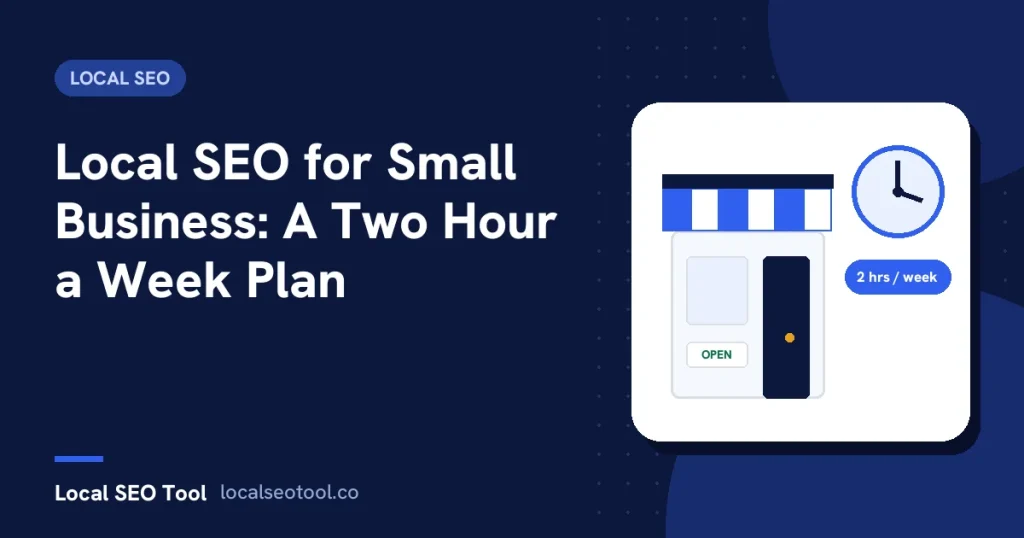

For a small business, local SEO comes down to four jobs. Keep your Google Business Profile complete and correct. Get a steady trickle of honest reviews. Have one web page for each service you sell, naming the town you serve. And make sure your name, address and phone number match everywhere they appear. Two hours a week is enough for one location once the setup is done.
Most local SEO advice is written for agencies with ten clients and a reporting tool. This page is local SEO for small business owners who do the work themselves, between jobs, with no marketing budget to speak of.
It assumes one location, a website you can edit or get edited, and about two hours a week. It tells you what to do in the first month, what to repeat every week after that, and what to ignore even though someone will try to sell it to you.
What Google is actually looking at
Google says local results come down to three things: relevance, distance and prominence. It explains all three on its page about improving your local ranking. Here is what each one means for a small business in plain terms.
- Relevance is whether your listing matches what the person typed. You control this through your category, your services and the words on your website.
- Distance is how far you are from the person searching. You can’t change this, and nobody can sell you a way around it.
- Prominence is how well known you are. Reviews, mentions on other websites and your general presence online all feed into it. You build this slowly.
That split tells you where your two hours should go. Distance is fixed, so every minute goes on relevance and prominence. If you want the longer version, our guide to local SEO ranking factors goes through each signal and what it is worth.
Month one: the setup
The first month takes more than two hours a week. Plan for about ten hours in total, spread over four weeks. After that the weekly routine takes over.
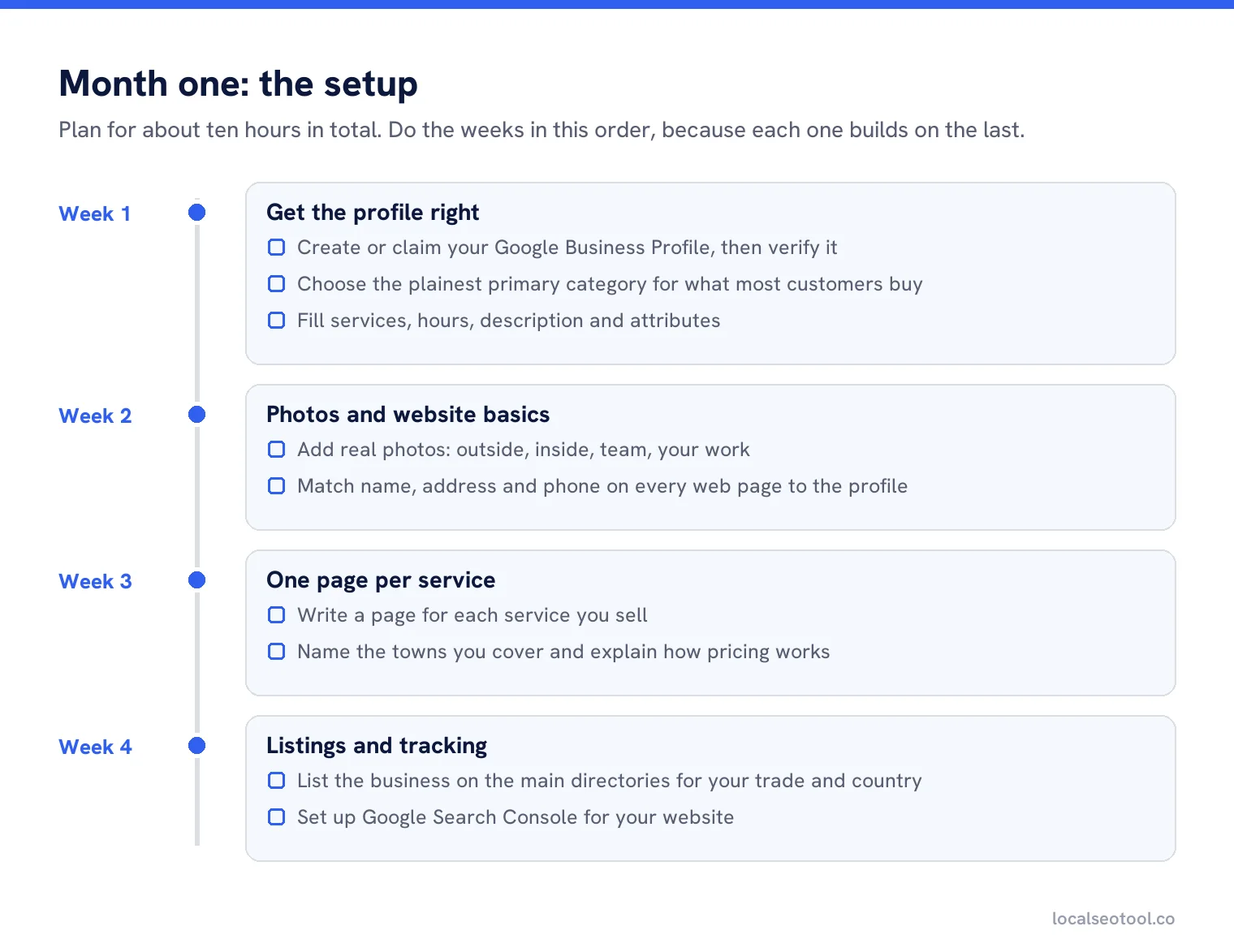
Week 1: get the profile right
If you don’t have a Google Business Profile, create one and verify it. If one already exists because a customer or Google made it, claim it rather than making a second one. Two listings for the same business split your reviews and confuse Google.
Then fix the primary category. This is the single field that matters most. A dentist should be Dentist, not Dental clinic or Health. Pick the plainest category that describes what most of your customers come for. Our guide to optimising your profile field by field covers the rest, including secondary categories, services, hours and the description.
Week 2: photos and the basics on your website
Add real photos: the outside of the building so people can find you, the inside, your team at work and examples of the job. Phone photos taken in daylight are fine. Stock photos are not, because Google wants images that show the actual place.
On your website, check that the name, address and phone number on every page match the profile exactly. Same spelling, same format, same number. If your footer says “Unit 4” and the profile says “Suite 4”, pick one and change the other.
Week 3: one page per service
This is the step most small businesses skip, and it’s often the one that holds them back. If you are a plumber who does boiler repair, blocked drains and bathroom fitting, you need three pages, one for each. A single “Services” page with three bullet points gives Google very little to match against.
Each page should say what the service is, who it is for, which towns or areas you cover, roughly what it costs or how pricing works, and how to book. Three hundred honest words beat a thousand words of filler. Our article on local content strategy explains why service pages come before blog posts.
Week 4: listings and tracking
Get your business listed on the handful of directories that matter for your country and trade, with the same name, address and phone as the profile. You do not need hundreds. Our free citation checklist sorts them into tiers so you can stop after the first two.
Last, set up Google Search Console for your website. It’s free and it shows which searches bring people to your site. You will use it every month from now on.
The two-hour week
Once the setup is done, this is the routine. It is deliberately boring. Local SEO for a small business rewards doing small things every week far more than doing big things once a year.
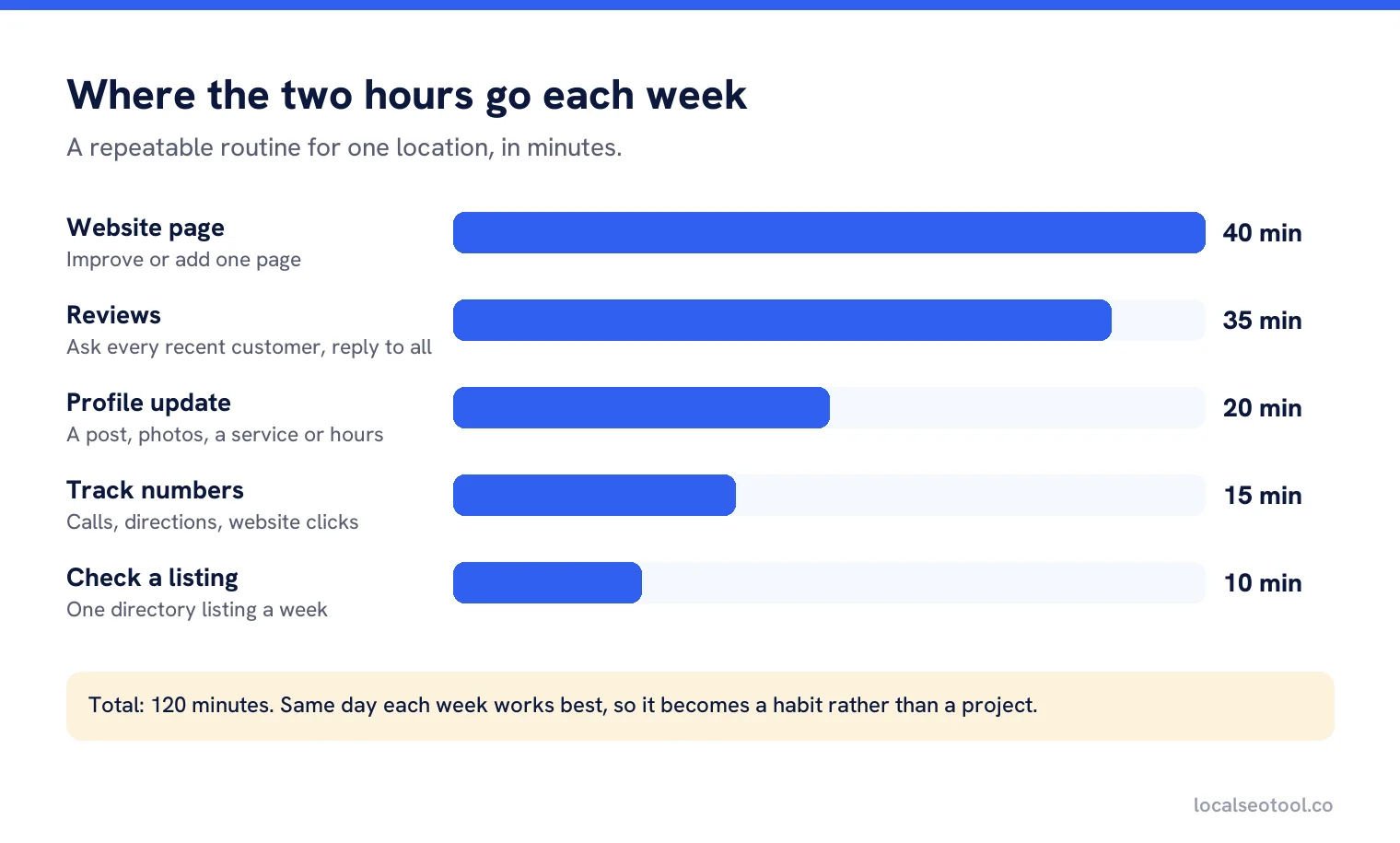
Ask for reviews and reply to them (35 minutes)
Send your review link to every customer from the past week, not just the ones you think were happy. Reply to every new review. Keep replies short and specific. Our guide on replying to Google reviews has the rules Google applies.
One profile update (20 minutes)
Add a post, a few new photos or a new service. Check your hours if a holiday is coming. A profile that changes a little every week looks cared for, to customers and to Google.
Improve one page on your website (40 minutes)
Add a section to a service page, answer a question customers keep asking, or add a few photos of a recent job with the town named. One page a week adds up to fifty a year.
Check one listing (10 minutes)
Pick one directory listing and check it still matches. Old addresses and phone numbers hang around for years if nobody fixes them.
Write down three numbers (15 minutes)
Calls, direction requests and website clicks from your profile. Same day each week. Without them you will be guessing whether any of this is working.
What to skip
Small businesses get sold a lot of local SEO that does nothing, and some of it does harm. If someone offers you any of the things on the right-hand side, say no.
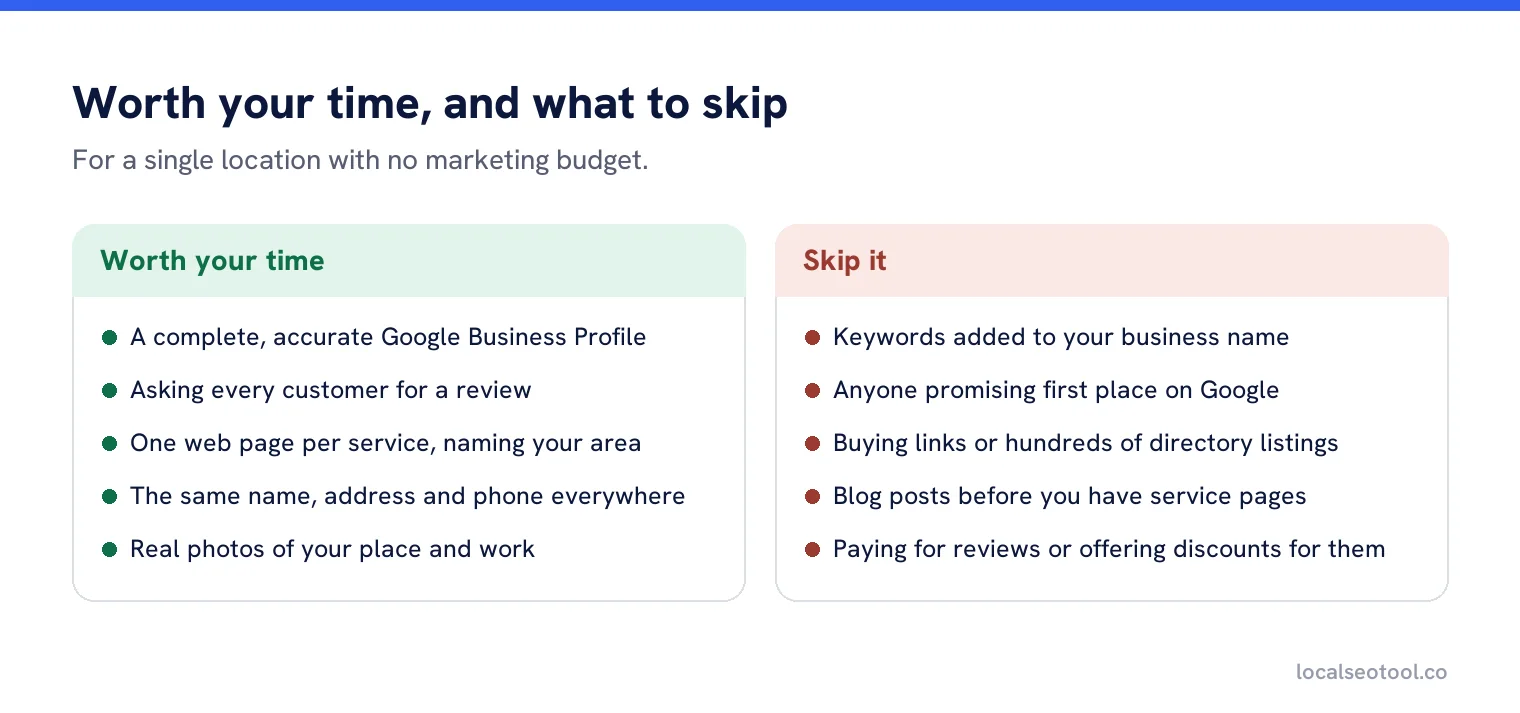
The one that causes the most damage is adding keywords to your business name on the profile. “Smith Plumbing” becoming “Smith Plumbing Emergency Plumber Leeds” can lift you for a few weeks. It also breaks Google’s rules for representing your business, and a competitor only has to suggest an edit or report it. Profiles get suspended for this, and getting one back takes time you don’t have.
Promises of a guaranteed first place are the other red flag. Because distance is part of how results are chosen, your position changes depending on where the searcher is standing. Nobody can guarantee a position that changes from one street to the next.
What is worth paying for
You can do everything on this page for free. If you have a little money, these are the places it makes the biggest difference, in order.
| What | Why it helps | Do it free first? |
|---|---|---|
| A photographer for half a day | Good photos of your place and your work get used everywhere: profile, website, social. | Yes, phone photos in daylight are fine to start. |
| Help writing service pages | Most owners know the work but find writing slow. A writer turns notes into pages fast. | Yes, if you can spare the time. |
| Automatic review requests | Sends your review link after each job so you never forget. | Yes, a text template on your phone works. |
| Rank tracking from your area | Shows where you appear across your town, not just from your own desk. | Partly. Spot checks are free, history isn’t. |
On the last one: when you search for your own business on your own phone, Google already knows who you are and where you are. The result you see is not what a customer three miles away sees. A local rank checker searches from a fixed point instead, which gives you an honest number. Our free keyword rank checker handles one-off checks, and our software for single location businesses adds honest tracking across your area plus a short, ordered task list.
How long it takes
Profile fixes, such as a better category or complete services, can show up within a few weeks. Reviews and directory listings take months, because they build up slowly. Service pages are somewhere in between: Google has to find them, and then trust them.
A fair expectation is that you see small changes in month two and clear changes by month four to six, if you keep the weekly routine going. If nothing has moved after six months of honest effort, run a free local SEO audit to find what’s blocking you. It is usually the category, a duplicate listing, or a website that never mentions the town.
How to tell if it’s working
Ignore your ranking for a single phrase from your own office. Look at what customers do instead. Your profile’s performance report shows calls, direction requests and website clicks. Search Console shows which searches brought people to your website.
Compare each month with the same month last year if you can, because most local businesses are seasonal. A roofer’s November and a roofer’s June are not comparable. And write down what you changed each month, so when a number moves you know why.
If you want a longer-term plan once the basics are running, our local SEO strategy guide turns this into a monthly calendar, and the benefits of local SEO sets out what the time and money actually buy you.
Do the weekly routine in one place
Rank tracking, review requests and profile updates for one location, from $57 a month with a three day free trial.
Frequently asked questions
Can I do local SEO myself as a small business owner?
Yes. Most of the work is keeping your Google Business Profile accurate, asking for reviews, and writing clear service pages. None of it needs special software. It needs about two hours a week and patience.
How much does local SEO cost for a small business?
It can cost nothing but your time. If you spend money, put it into good photos, help writing service pages, or a tool that sends review requests and tracks rankings across your area.
How long does local SEO take to work?
Profile fixes can show within a few weeks. Reviews and listings take months. Most single location businesses see clear movement between month four and month six if they keep the weekly routine going.
Do I need a website for local SEO?
You can appear in the map results with only a Business Profile, but a website with a page for each service gives Google much more to match against searches. It also helps the customers who want more detail before they call.
Should I put keywords in my business name?
No. Your profile name must match your real business name. Adding keywords breaks Google rules and is one of the most common reasons profiles get suspended.
Sources
The Google documentation behind the guidance on this page. Google changes these pages without notice, so check the date on any figure before you rely on it.