
A local SEO checklist has six parts, done in this order: your Google Business Profile, your website, reviews, citations, tracking, then a short monthly routine. The profile comes first because it’s the fastest to fix and the most visible. The list below has 42 tasks. Most businesses can work through the first four parts in about four weeks.
This local SEO checklist is a to-do list, not an audit. An audit tells you what’s broken. This tells you what to do, in an order that means each task makes the next one easier. If you’d rather find problems first, start with our guide to running a free local SEO audit in one afternoon, then come back here.
Each section has a table with the task, why it matters and roughly how long it takes for one location. At the bottom there’s a plain text version you can copy into your notes app and tick off.
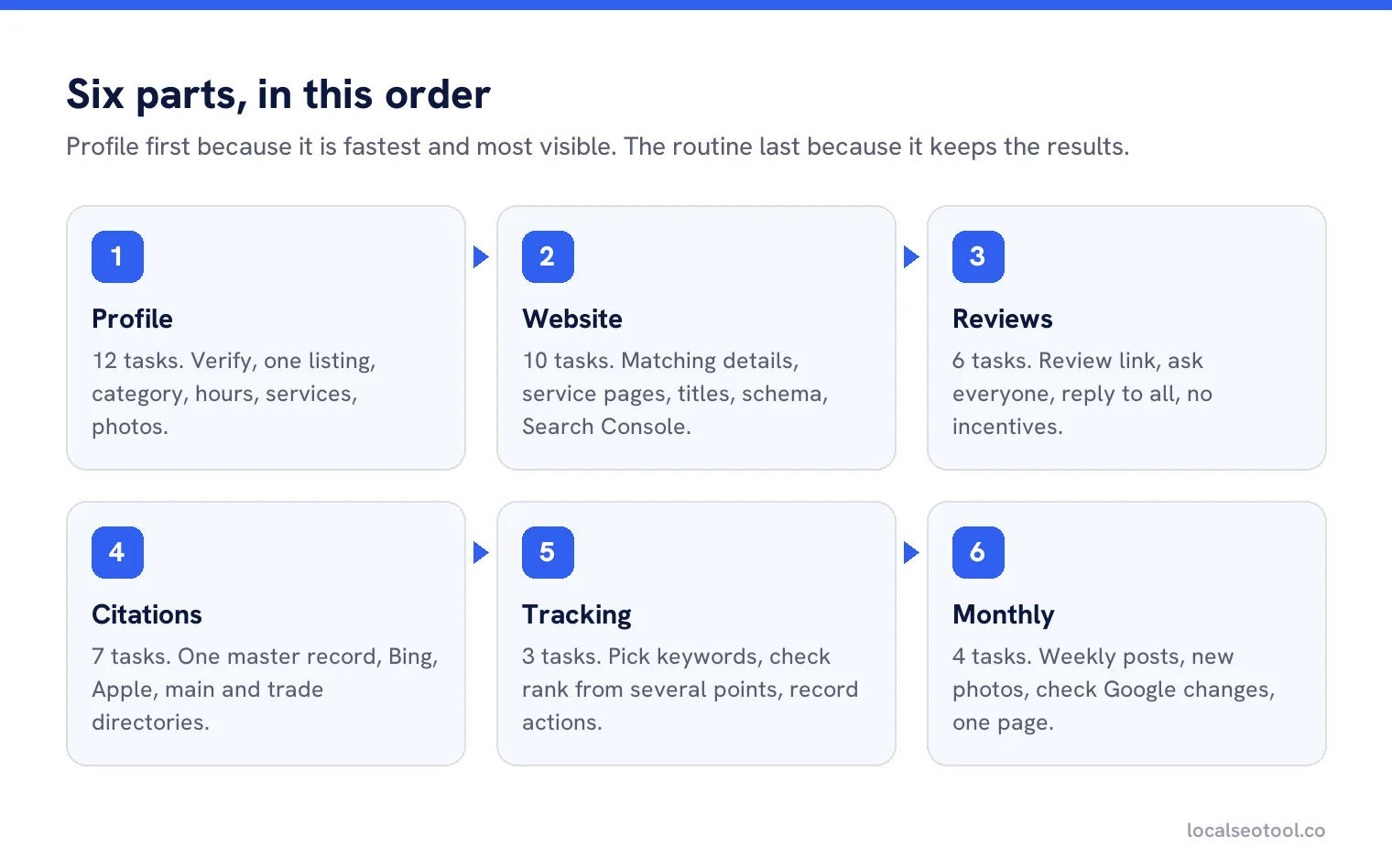
Part 1: Google Business Profile (12 tasks)
Your profile is what appears in the map results, so it’s where most local customers first see you. Fix it before anything else.
| Task | Why it matters | Time |
|---|---|---|
| 1. Claim and verify the profile | Most of the profile can’t be fully edited, and photos won’t show, until it’s verified. See how to verify. | 15 min, plus waiting |
| 2. Check for duplicates | Two listings split your reviews and confuse Google. Merge them. | 10 min |
| 3. Use your real business name | Extra keywords in the name break Google’s rules and risk suspension. | 2 min |
| 4. Choose the primary category | The field with the most influence on which searches you show for. | 10 min |
| 5. Add secondary categories | Only ones that describe a real part of the business. | 5 min |
| 6. Set address or service area | Businesses that visit customers and don’t serve them at the address should hide it and set a service area. | 5 min |
| 7. Set hours and special hours | Wrong hours send customers to a locked door, and invite the public to suggest edits. | 5 min |
| 8. Use a local phone number | The same number as your website and listings. | 2 min |
| 9. Link to the right page | Your home page, or the location page for a branch. Never a third party booking site you don’t control. | 2 min |
| 10. List services or products | Each one is another way to match a search. | 20 min |
| 11. Write the description | Plain words about what you do and where. No links, no offers. | 15 min |
| 12. Add real photos | Exterior, interior, team and your work. Google asks for at least three of each type that fits. | 30 min |
Our guide to optimising each profile field goes deeper on tasks 4 to 11. If the profile doesn’t exist yet, start here.
Part 2: Your website (10 tasks)
The website backs up everything the profile says. When the two disagree, Google can change your profile to match other sources, so this section matters more than it looks.
| Task | Why it matters | Time |
|---|---|---|
| 13. Match name, address and phone | Exactly as on the profile, on every page, usually in the footer. | 15 min |
| 14. One page per service | A single “Services” page gives Google little to match. See our content strategy guide. | 1 to 2 hrs each |
| 15. One page per location | Only if you have more than one branch. | 1 hr each |
| 16. Page titles with service and town | “Boiler Repair in Leeds | Smith & Sons” says more than “Services”. Our free meta tag generator previews it. | 5 min a page |
| 17. Add LocalBusiness schema | Structured data that states your name, address, hours and phone in a format Google reads. Use our free schema generator. | 15 min |
| 18. Tap to call on mobile | Most local searches happen on phones. | 5 min |
| 19. Map on the contact page | Helps customers find you and confirms the location. | 5 min |
| 20. Check pages can be indexed | A stray rule in robots.txt can hide the whole site. Test it with our free robots.txt tester. | 5 min |
| 21. Fast on a phone | Compress large images. Remove plugins you don’t use. | 30 min |
| 22. Set up Search Console | Google Search Console shows which searches bring people to your site. | 15 min |
For the schema in task 17, Google’s own LocalBusiness structured data guide lists the properties it reads. The generator above fills in the format for you.
Part 3: Reviews (6 tasks)
| Task | Why it matters | Time |
|---|---|---|
| 23. Get your review link | A direct link to the review form. Make one with our free review link generator. | 5 min |
| 24. Ask every customer | Not just the ones you think were happy. Google doesn’t allow picking. | Ongoing |
| 25. Never offer anything for a review | No discounts, gifts or prize draws. Incentivised reviews get filtered. | 0 min |
| 26. Reply to every review | The reply is for the next customer reading it. See how to reply. | 5 min each |
| 27. Report reviews that break policy | Spam and conflicts of interest can be reported in Google’s reviews management tool. | 10 min |
| 28. Write down the count and average | Same day every month, so you can see the trend. | 2 min |
On task 27, be realistic. A review is removed only if it breaks a policy, and disliking it is not a breach. Our guide on removing a Google review explains which grounds work.
Part 4: Citations and listings (7 tasks)
A citation is any mention of your name, address and phone on another website. On their own they are not a big ranking lever, but wrong ones still cause damage by feeding old details back to Google.
| Task | Why it matters | Time |
|---|---|---|
| 29. Write one master record | The exact name, address, phone and website you’ll use everywhere. | 10 min |
| 30. Claim Bing Places | Bing Places feeds Bing search and Bing Maps. | 15 min |
| 31. Claim Apple Business | Apple Business controls how you appear in Apple Maps. | 15 min |
| 32. Main directories for your country | The big general directories first. Stop after the first tier if time is short. | 1 hr |
| 33. Directories for your trade | Industry sites that customers actually use carry more weight than general ones. | 1 hr |
| 34. Fix old addresses and numbers | Search your old phone number in quotes to find listings that still use it. | 30 min |
| 35. Remove duplicate listings | Two entries on the same directory compete with each other. | 20 min |
Our citation checklist splits directories into four tiers so you know where to stop, and citations and NAP consistency explains how much they actually matter.
Part 5: Tracking (3 tasks)
| Task | Why it matters | Time |
|---|---|---|
| 36. Pick 5 to 10 keywords | The words customers use for what you sell, plus your town. Our guide to local keyword research shows how. | 30 min |
| 37. Check rank from several points | Your rank changes across town. Checking from your desk only shows one point. See our rank checker guide. | 15 min |
| 38. Record profile actions monthly | Calls, direction requests and website clicks from your profile report. | 10 min |
Part 6: The monthly routine (4 tasks)
The first five parts are mostly done once. These four are the ones that keep the results.
- 39. Post on the profile every week. Google archives posts after six months, so a quiet profile soon looks closed.
- 40. Add a few new photos each month. Recent jobs, new staff, seasonal changes.
- 41. Check for changes Google made. Look for blue text in the profile editor and a notice at the top. Google can change details using public suggestions.
- 42. Improve one website page. Add a section, answer a question customers keep asking, or add photos of a recent job.
Copy this checklist
Paste this into your notes app, a spreadsheet or a shared document and tick as you go.
PROFILE
[ ] 1 Claim and verify
[ ] 2 Check for duplicates
[ ] 3 Real business name only
[ ] 4 Primary category
[ ] 5 Secondary categories
[ ] 6 Address or service area
[ ] 7 Hours and special hours
[ ] 8 Local phone number
[ ] 9 Website link
[ ] 10 Services or products
[ ] 11 Description
[ ] 12 Real photos
WEBSITE
[ ] 13 Name, address, phone match
[ ] 14 One page per service
[ ] 15 One page per location
[ ] 16 Titles with service and town
[ ] 17 LocalBusiness schema
[ ] 18 Tap to call
[ ] 19 Map on contact page
[ ] 20 Pages can be indexed
[ ] 21 Fast on a phone
[ ] 22 Search Console
REVIEWS
[ ] 23 Review link
[ ] 24 Ask every customer
[ ] 25 No incentives
[ ] 26 Reply to every review
[ ] 27 Report policy breaches
[ ] 28 Record count and average
CITATIONS
[ ] 29 Master record
[ ] 30 Bing Places
[ ] 31 Apple Business
[ ] 32 Main directories
[ ] 33 Trade directories
[ ] 34 Fix old details
[ ] 35 Remove duplicates
TRACKING
[ ] 36 Pick 5 to 10 keywords
[ ] 37 Rank from several points
[ ] 38 Record profile actions
EVERY MONTH
[ ] 39 Weekly posts
[ ] 40 New photos
[ ] 41 Check Google changes
[ ] 42 Improve one page
If you get stuck halfway, the order still protects you. A business that finishes parts 1 to 3 and nothing else is in a much better place than one that did a little of everything. For a longer plan once the list is done, see our monthly local SEO strategy.
Turn the checklist into a task list that tracks itself
Smart tasks orders the work for each location and closes items off as they’re done. Three day free trial.
Frequently asked questions
What should be on a local SEO checklist?
Six areas: your Google Business Profile, your website, reviews, citations and listings, tracking, and a short monthly routine. The profile and website make up most of the early work.
What is the first thing to do in local SEO?
Claim and verify your Google Business Profile, then check there is only one listing for your business and that the primary category is right.
How long does it take to complete a local SEO checklist?
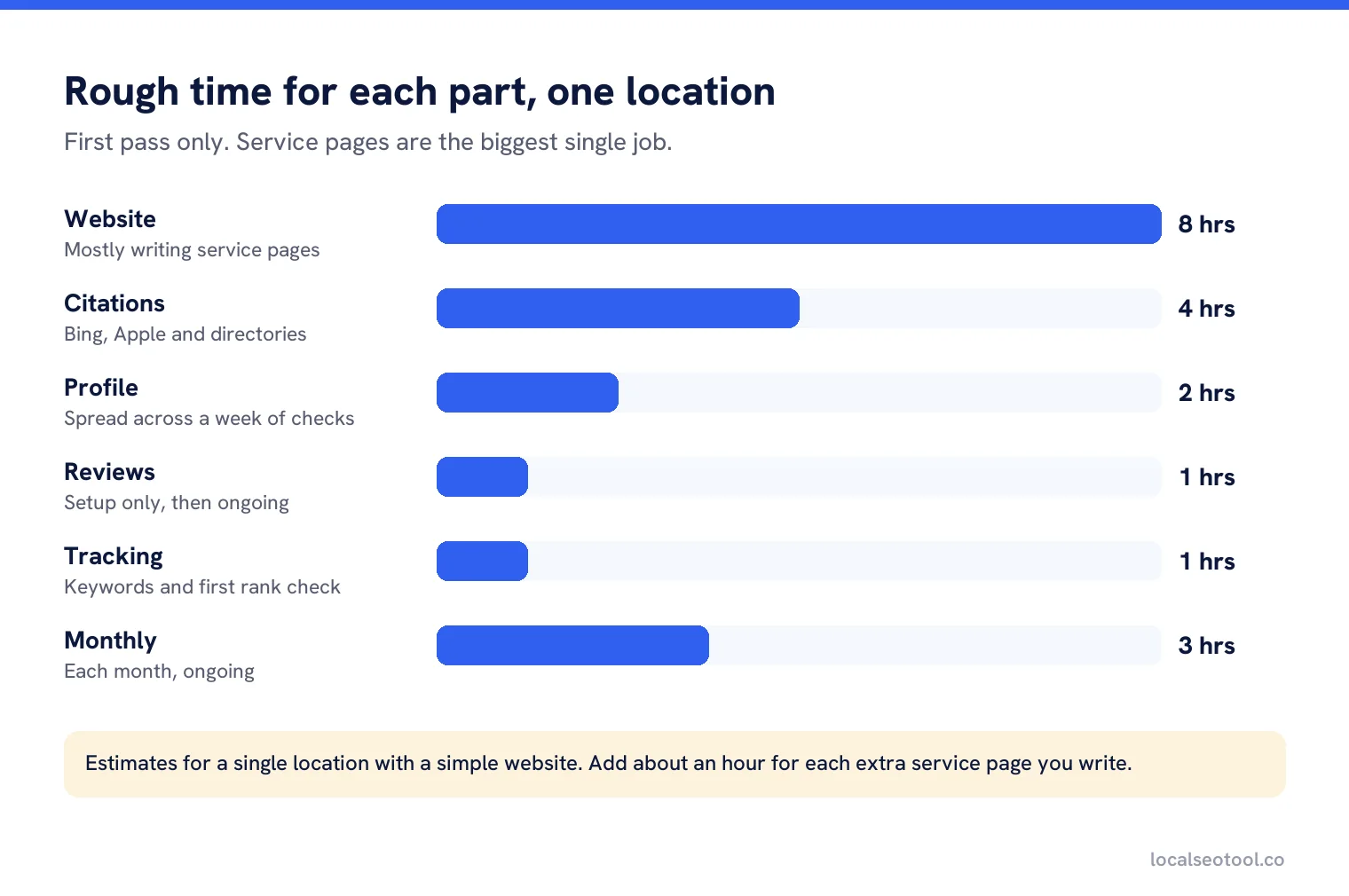
For one location, the first four parts take about four weeks at a few hours a week. The service pages on your website take the most time.
Is a local SEO checklist the same as an audit?
No. An audit finds what is wrong with what you already have. A checklist is the list of work to do. Many people run an audit first, then use the checklist to fix what it found.
Do I need to list my business on hundreds of directories?
No. Start with Bing Places, Apple Business, the main directories for your country and the ones for your trade. Accuracy matters more than the number of listings.
Sources
The Google documentation behind the guidance on this page. Google changes these pages without notice, so check the date on any figure before you rely on it.