
When Google reviews are not showing, the cause is usually one of three things. The review is still being checked, which can take a few days. It was removed or filtered for breaking a policy, and Google doesn’t restore those. Or something happened to the profile, such as a merge or a reinstatement. Google lists all of these on its help page about missing or delayed reviews.
A customer tells you they left a five star review. You look, and it isn’t there. Or your count dropped from 84 to 79 overnight and nobody can explain why. Google reviews not showing is one of the most common complaints from business owners, and one of the least clearly explained.
This guide goes through the nine causes Google itself describes, how to tell which one you’re dealing with, and what you can actually do about each. Some of them fix themselves in a few days. Some of them can’t be fixed at all, and it’s better to know that before you spend a week on it.
First, make sure the review is really missing
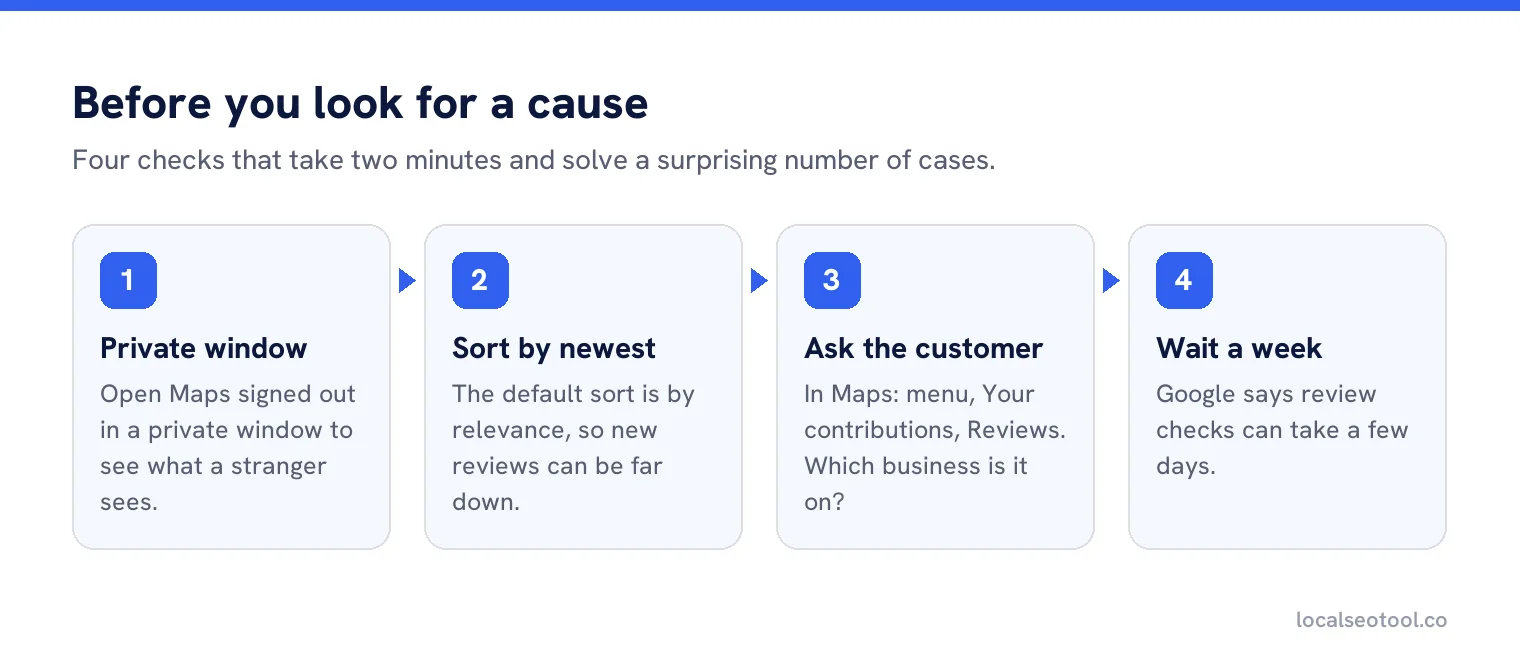
Before you look for a cause, rule out the simple explanation: you might be looking in the wrong place. Do these three checks first. They take two minutes.
Look in a private window
Open Google Maps in a private or incognito browser window, signed out, and search for your business. This shows what a stranger sees, without your account getting in the way.
Sort by newest
Google sorts reviews by relevance by default, so a new review may be far down the list. Choose Newest and look again.
Ask the customer where they posted it
In Google Maps, a reviewer can see their own reviews under the menu, then Your contributions, then Reviews. If it’s listed under a different business with a similar name, you’ve found your answer.
If the review still isn’t there, work through the causes below.
The nine causes
1. It’s still being checked
Google checks every review against its policies before showing it. Google says this can take a few days, which delays the review’s appearance. This is the most common reason a brand new review isn’t showing.
What to do: Wait. Give it a week before you assume anything else. There’s nothing you can do to speed it up.
2. It was removed for breaking a policy
Google removes reviews it decides are spam or inappropriate. It says plainly that reviews removed for policy violations are not restored. Its Maps help page goes further: “We don’t reinstate reviews that were removed for policy violations.”
What to do: Nothing for that review. Focus on getting new ones the right way.
3. It was filtered as fake engagement
This is the cause owners most often don’t want to hear. Google’s content policy for Maps lists reviews that don’t count as a genuine experience. They include reviews from current or former staff, family members and business partners, reviews that were paid for in money or in kind, and several reviews posted from different accounts at one person’s request.
The policy also covers how you ask. Businesses must not offer incentives, must not selectively ask happy customers only, and must not pressure people to review while they’re on the premises. Reviews collected that way are the ones most likely to disappear.
What to do: Stop the practice that caused it. Ask every customer the same way, with no reward. Our guide to review management sets out a process that stays inside the rules.
4. Two profiles were merged recently
If you merged a duplicate listing into your main profile, Google says it can take a few days for the reviews from both profiles to show on Search and Maps.
What to do: Wait a few days after the merge. If you still have a duplicate, see how to merge duplicate profiles.
5. The review is on a different listing
Customers sometimes review the wrong place. A business with an old listing at a previous address, a second listing someone made by mistake, or a competitor with a similar name can all catch reviews meant for you.
What to do: Search Maps for your name and look for a second listing. If it’s yours, merge it. If it belongs to someone else, there’s nothing to move, but you can send the customer your direct review link so they can post on the right profile. Our free review link generator makes one in a minute.
6. The customer’s phone or app is out of date
Google says customers using older phones or older software can have trouble posting reviews. They may think it posted when it didn’t.
What to do: Ask the customer to update the Google Maps app and try again, or to post from a computer.
7. Reviews are switched off for the profile or category
Google may temporarily switch off user content, including reviews, for certain profiles or business categories. It describes this as a way to protect owners.
What to do: This is usually temporary. If it doesn’t lift, contact Business Profile support through the help centre.
8. Your category is a school
Profiles mainly categorised as schools for students aged 6 to 18 have reviews and ratings removed and switched off. Existing reviews are deleted and new ones aren’t allowed. Google says universities, day care centres and swim schools are not included.
What to do: If you’re not a school and your category says you are, change the category. If you are a school, there’s no route back to reviews.
9. Your profile was reinstated after a suspension
Google says reviews can be removed after a profile is reinstated. Owners who’ve just won a suspension appeal are often surprised to find fewer reviews than before.
What to do: Google asks you to contact support if reviews were removed after a reinstatement.
All nine at a glance
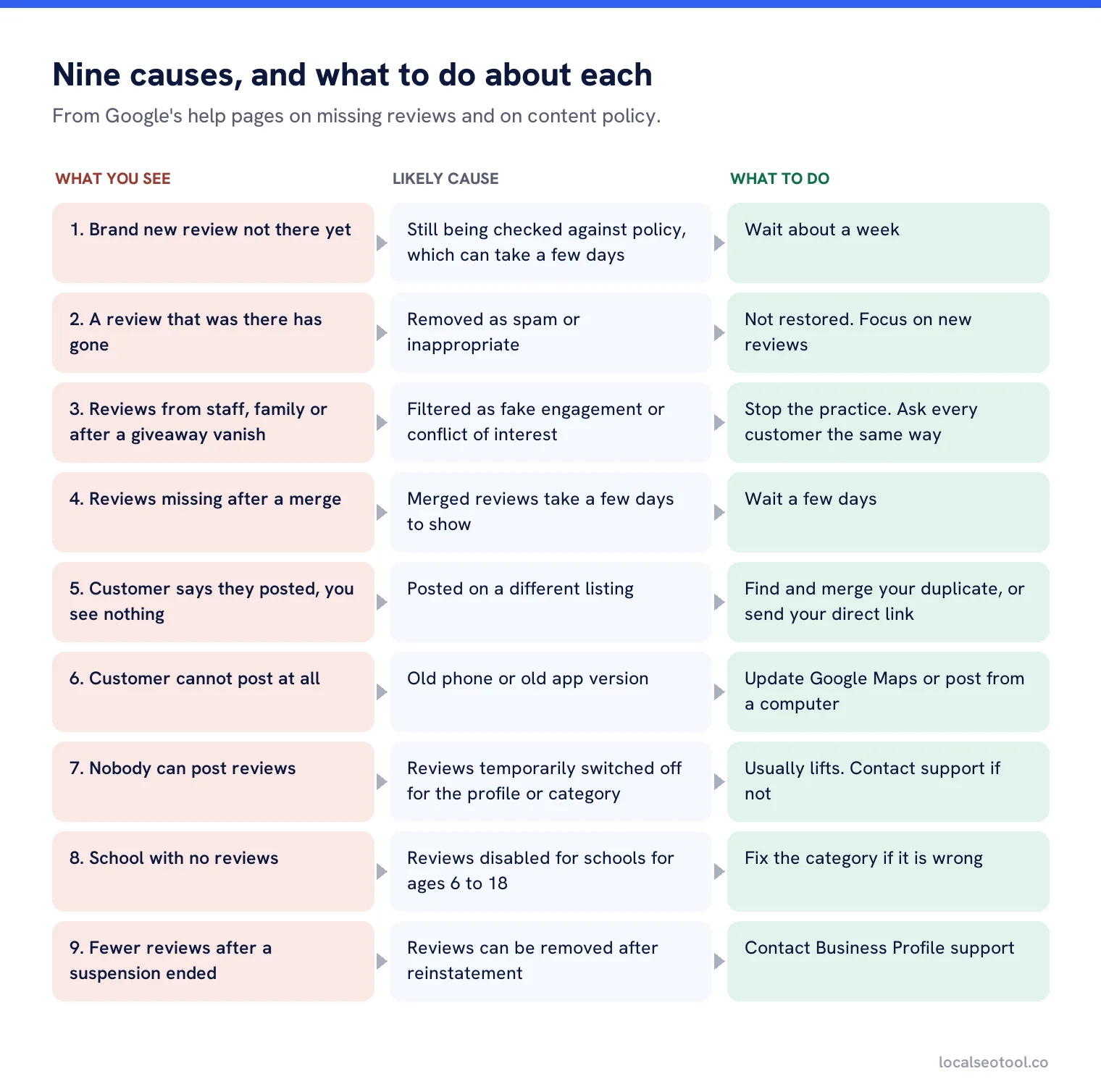
What you can and can’t do
Be clear about where your power ends, because a lot of time is wasted here.
| You can | You can’t |
|---|---|
| Wait a few days for checks or a merge to finish | Make Google restore a review removed for a policy breach |
| Ask the customer to update the app and post again | Speed up Google’s review checks |
| Merge a duplicate listing that’s catching reviews | Move a review from someone else’s listing to yours |
| Change a wrong category | Turn reviews back on for a school category |
| Contact support after a reinstatement | Get a reason for each individual filtered review |
For reviews you want removed rather than restored, the route is different. Google’s reviews management tool lets you report reviews that break policy, check the status of past reports, and make a one-time appeal. Our guide to removing a Google review covers which reports tend to work.
How to stop it happening again
You can’t prevent every missing review, but most lost reviews follow a pattern you can avoid.
- Ask everyone, the same way. One link, sent to every customer after the job. No special treatment for the ones you think liked you.
- Never reward a review. No discount, no free item, no prize draw. Not even once.
- Keep staff and family out of it. However well meant, these are conflict of interest reviews under Google’s policy.
- Have one listing. Duplicates catch reviews and get merged later, with a delay.
- Record your count each month. A sudden drop is much easier to explain when you notice it the same week.
On the last point, our review alerts tell you as soon as a review arrives, and centralised reviews keeps a record of every review at every location. A review that appears in your record and later vanishes from Google is a clue in itself, because it tells you the review was live and then removed, rather than never posted.
If reviews are showing but you’re not sure how to answer them, see how to reply to Google reviews without getting rejected.
Know the moment a review arrives, or disappears
Review alerts and a single inbox for every location, so changes to your count never go unexplained. Three day free trial.
Frequently asked questions
How long does it take for a Google review to show up?
Google checks reviews against its policies before showing them. It says this can take a few days. Wait about a week before assuming something else is wrong.
Why did my Google review count go down?
Google removes reviews it finds break its policies, such as spam, fake engagement or conflict of interest. Reviews can also be removed after a profile is reinstated. Removed reviews are not restored.
Can I get a deleted Google review back?
Not if it was removed for a policy breach. Google says it does not reinstate those reviews. If reviews went missing after a reinstatement, contact Business Profile support.
Why can my customer not leave a review?
They need to be signed in to a Google account, and older phones or app versions can fail to post. Ask them to update the Google Maps app or use a computer. Reviews may also be switched off for some profiles or categories.
Do reviews from my staff count?
No. Google treats reviews from current or former employees, family and business partners as a conflict of interest, and they are likely to be removed.
Sources
The Google documentation behind the guidance on this page. Google changes these pages without notice, so check the date on any figure before you rely on it.