
Local SEO automation works best on jobs that follow a fixed rule: sending review requests after each job, running rank checks, publishing scheduled posts, alerting you to profile changes and building monthly reports. Keep people in charge of anything a customer reads as a personal reply, and anything that changes your profile’s facts. Google’s own API rules require the owner’s prior, specific consent before review replies are automated, and they ban tools that automatically undo Google’s changes.
Local SEO automation gets sold two ways. One pitch says the software does everything and you never log in again. The other says automation is spammy and Google will punish you for it. Both are wrong.
Most of the weekly work in local SEO is repetitive. The same review request, the same rank check, the same post schedule, the same report. Those jobs are perfect for automation because a machine does them more consistently than a busy person. A smaller set of jobs needs judgement, and automating those is where businesses get into trouble.
This guide sorts the work into three groups, explains Google’s rules on automation, and shows how to set it up without breaking anything.
The three groups
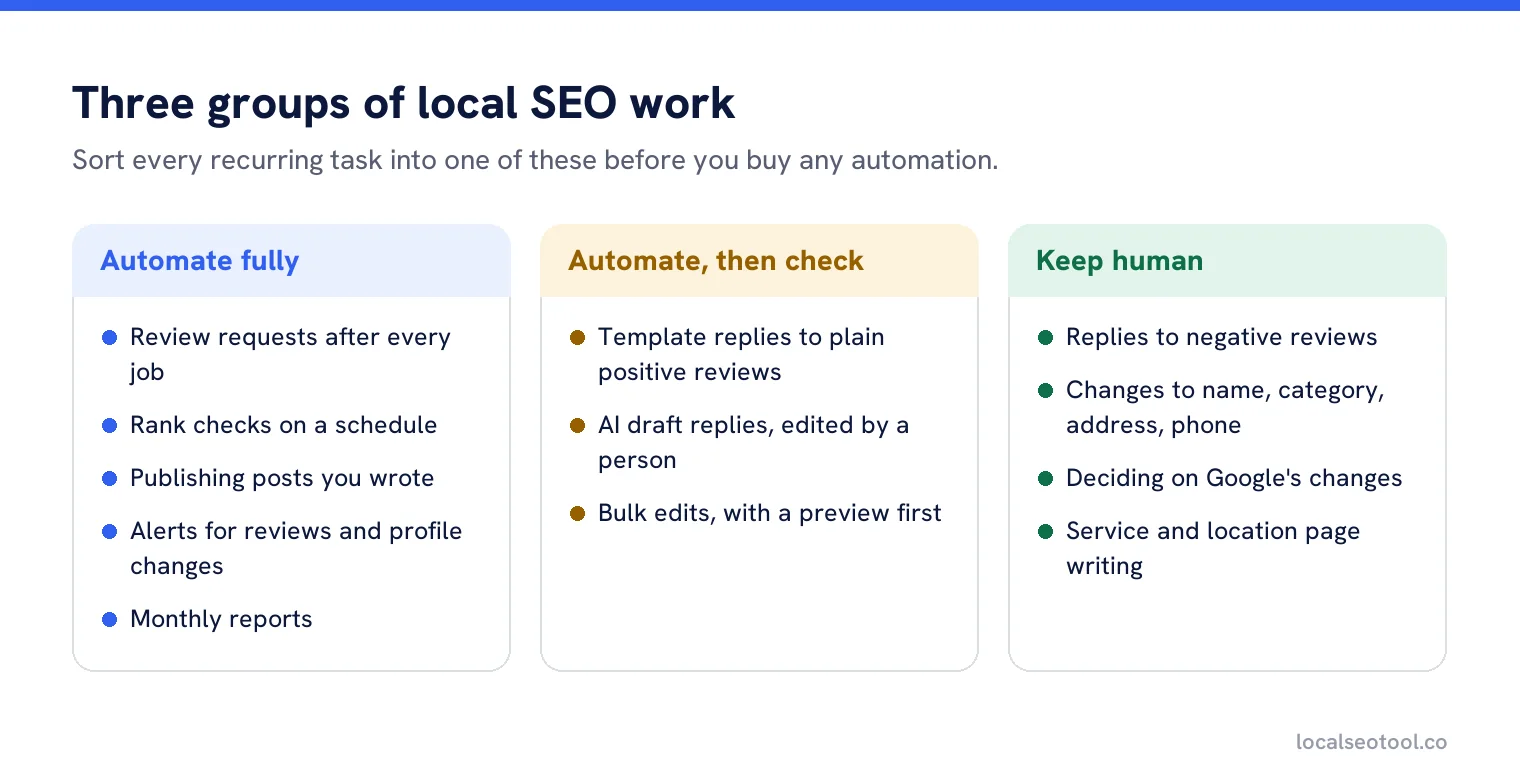
The dividing line is simple. If the job follows the same rule every time and a mistake is easy to spot and cheap to fix, automate it. If the job needs you to read the situation, or a mistake is public and hard to undo, keep a person in the loop.
Jobs worth automating fully
Review requests
Send a request after every job, with one follow-up for people who meant to and forgot. Automation does something here that people often don’t: it asks every customer the same way. Google’s policy says businesses must not selectively ask for positive reviews, and a rule that fires after every completed job is the simplest way to stay inside it. Our review generation feature works this way.
Rank checks
Checking where you appear across your area, every week, from the same points. A person doing this by hand checks less often and from fewer places, so the data is patchy. Our local rank tracker runs these on a schedule.
Scheduled posts and photos
You still write the posts. The automation is only the publishing, on the days you choose. Publishing is the step that slips in a busy month. See our post scheduler.
Alerts
A new review, a low rating, a change to your hours that you didn’t make. An alert doesn’t change anything. It tells the right person quickly, so it’s always safe to automate. Our review alerts arrive within minutes.
Monthly reports
Pulling the same numbers into the same layout each month. If you send reports to clients or a manager, our guide to automating white label reports covers the setup.
Jobs to automate with a person checking
These save a lot of time, but each one needs someone to look before or after it runs.
Replies to straightforward positive reviews
“Great service, thanks!” doesn’t need a custom reply. A template that rotates through several versions works fine, as long as the same sentence doesn’t appear twenty times in a row on your profile. Readers notice that, and it looks like nobody’s listening. Our template auto-reply rotates wording and leaves anything critical for a person.
Two things to get right. First, if an agency or tool replies for a business, Google’s rules require the owner’s prior, specific consent. Second, keep the template away from any review below four stars or any review that mentions a problem, even if the rating is high.
Draft replies written by AI
An AI draft that reads the review and writes a first version saves time, especially for longer reviews. But the draft should never post itself. A person adds the specific detail, such as the branch, the name of the staff member or what was done to fix the problem, which is what makes a reply believable. That’s how our AI review response feature works. For more on where AI helps and where it doesn’t, see AI and local SEO.
Bulk edits across locations
Changing holiday hours on thirty profiles in one action is a big time saving. It’s also the easiest way to put the wrong hours on thirty profiles at once. Always look at a preview of exactly what will change before you apply it. Our bulk update shows that preview by default.
Jobs to keep human
- Replies to negative reviews. The next customer reads them closely. A reply that sounds generic, or gets the facts wrong, does more harm than no reply. Our guide on replying to reviews covers what to say.
- Changes to your business facts. Name, category, address and phone. Mistakes here can lead to suspension or lost visibility.
- Responding to Google’s changes. When Google updates your profile, a person should decide whether the change is right. More on that below.
- Writing your service and location pages. These need to say true, specific things about your business. Mass-produced pages with the town name swapped are exactly what Google’s spam policies describe as doorway pages.
Google’s rules on automation
Most automation tools use Google’s Business Profile APIs to read and change profiles. Google’s API policies set the rules every tool has to follow. Owners rarely read them, but they explain a lot about what a good tool will and won’t do.
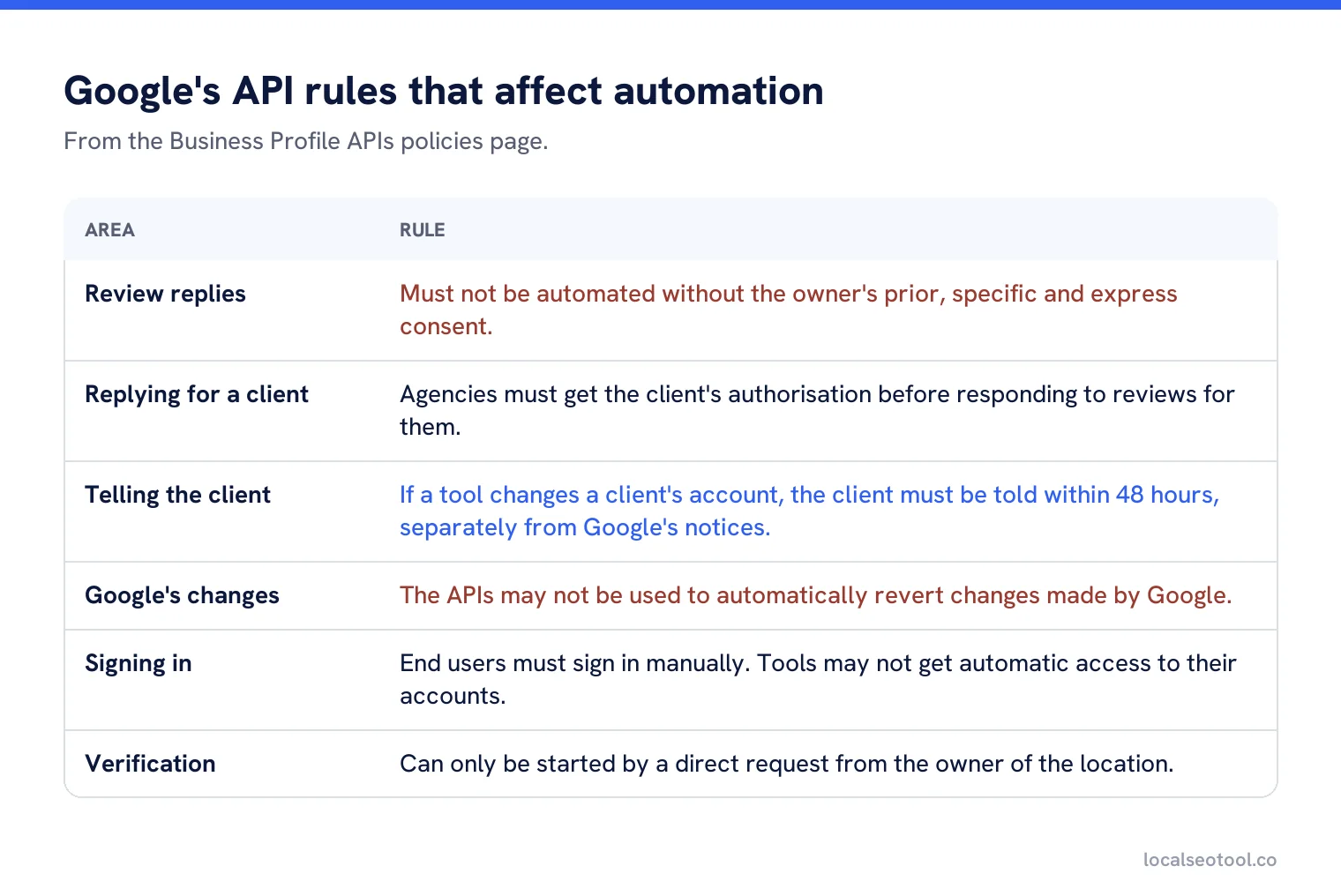
The 48 hour rule is worth knowing if you hire an agency or use a third party tool. Google says a tool that changes a client’s account must tell the client within 48 hours, in a notice separate from Google’s own. If your agency’s tool is changing your profile and you’ve never been told, ask why.
The ban on automatic reverts surprises people most. It’s tempting to set up a rule that puts your hours back every time Google changes them. Google forbids it, and for good reason: sometimes Google’s change is right. The approved pattern is an alert, then a person decides. That’s how our profile protection works.
Google review automation, specifically
Review automation is the most searched part of this topic, and the one with the most rules. Here’s what’s allowed and what isn’t, in one place.
| Automation | Allowed? | The condition |
|---|---|---|
| Sending review requests after each job | Yes | To every customer, with no reward for leaving one |
| A follow-up reminder | Yes | One is enough. Several feels like pressure |
| Sending requests only to happy customers | No | Google bans selectively asking for positive reviews |
| Offering a discount for a review | No | Google bans incentives of any kind |
| Template replies to positive reviews | Yes | With the owner’s prior, specific consent if a third party does it |
| Automatic replies to negative reviews | Avoid | Not banned outright, but high risk and almost always worse than a person |
| Alerts for new or low reviews | Yes | Alerts change nothing on the profile |
The source for the request rules is Google’s content policy for Maps. For a monthly review process that puts these together, see Google review management.
How to set it up without breaking anything
List what you do every week
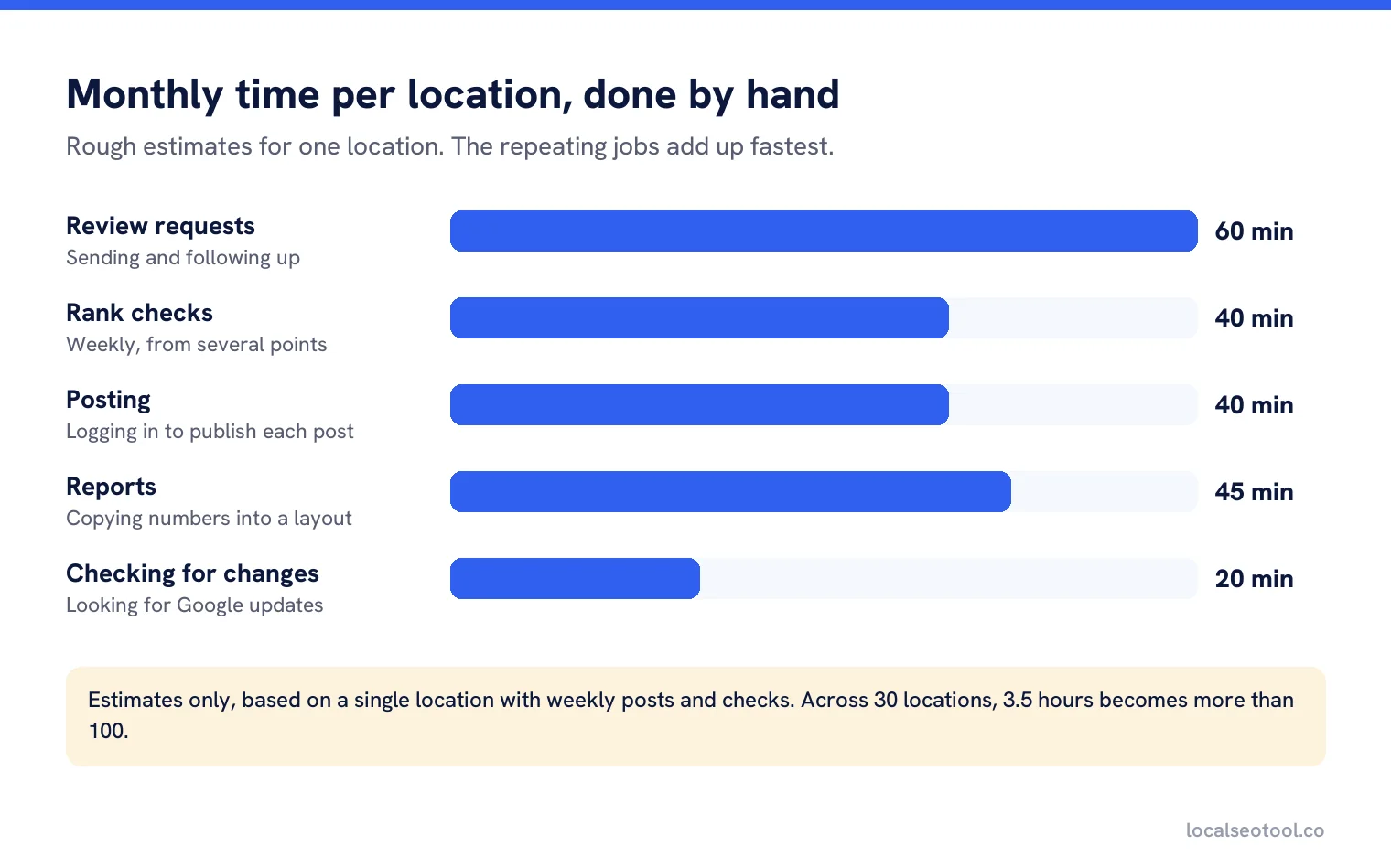
Write down every local SEO task and roughly how long it takes. Most owners are surprised by how much of the list repeats.
Start with alerts and requests
Both are safe, because alerts change nothing and requests are easy to stop. Run them for a month before adding anything else.
Add scheduling next
Write a month of posts in one sitting, then let the schedule publish them. Check the first few went out as expected.
Add template replies last
Only for positive reviews, only with rotating wording, and only once you’ve read a month of reviews and know what they usually say.
Keep a log and read it
Every automated action should be recorded somewhere you can see. Spend ten minutes a month reading it.
Automation across many locations
For a single business, automation saves an hour or two a week. For a business with thirty locations, it’s the difference between the work getting done and not. A change that takes four minutes on one profile takes two hours across thirty. Nobody decides to skip the work. It just loses to whatever else is happening that week.
If that’s your situation, our comparison of tools that automate profile updates across locations covers the options, and our GMB automation feature runs posting, review requests and rank scans across every location, with every action logged.
Put the routine work on a schedule
Review requests, rank scans, posts and alerts for every location, with every action logged. Three day free trial.
Frequently asked questions
What parts of local SEO can be automated?
Review requests, scheduled rank checks, publishing posts you have written, alerts for new reviews or profile changes, and monthly reports. These follow fixed rules and are easy to check.
Is it against Google rules to automate review replies?
Not in itself, but Google's API policies say tools must not automate review replies without the owner's prior, specific and express consent. Keep negative reviews for a person to answer.
Can I automate Google review requests?
Yes, as long as every customer gets the same request and nobody is offered anything in return. Sending requests only to happy customers is against Google's policy.
Will automation get my Business Profile suspended?
Not if you automate the right jobs. Suspension risk comes from automating changes to your business facts, building mass location pages, or breaking review rules, not from scheduling posts or sending requests.
Can a tool automatically undo changes Google makes to my profile?
No. Google's API policies forbid using the APIs to automatically revert Google's changes. Use an alert so a person can decide whether the change is right.
Sources
The Google documentation behind the guidance on this page. Google changes these pages without notice, so check the date on any figure before you rely on it.