
A multi-location SEO strategy has four layers: one Google Business Profile for each real location, one page for each location on your main website, one master record that feeds both, and reviews and reporting split by branch. The part most businesses get wrong isn’t technical. It’s deciding which jobs head office owns and which each branch owns, then writing that down.
With one location, local SEO is a to-do list. With ten or fifty, it’s a system. The tasks are the same, but the hard questions change. Who updates the hours when a branch closes early? Who replies to the one star review in Manchester? Who notices that the Bristol page still shows a manager who left last year?
This guide sets out a multi-location SEO strategy that answers those questions. It covers the four layers, the ownership split between head office and branches, and the mistakes that cost multi-location brands the most visibility.
The four layers
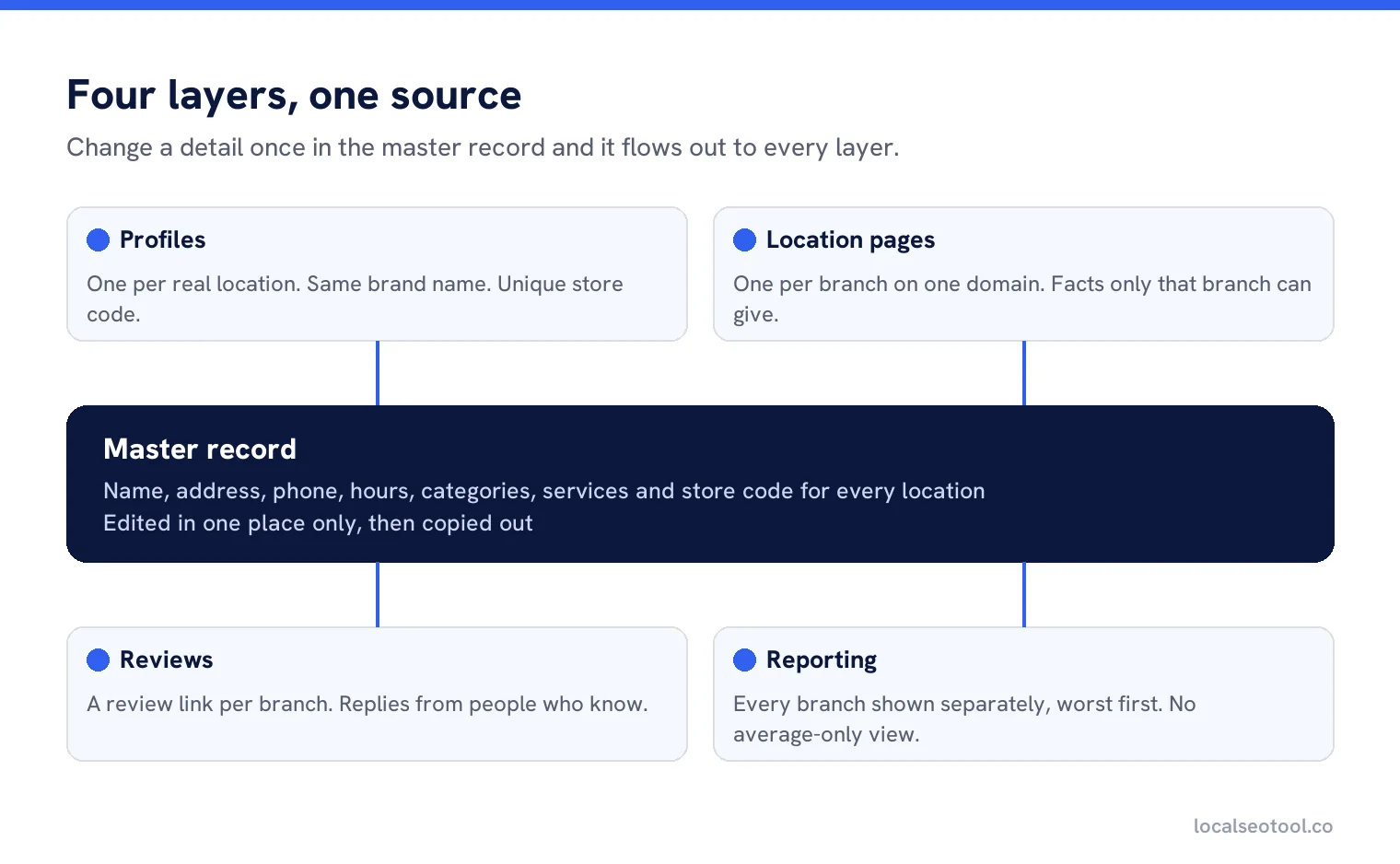
Everything flows from the master record in the middle. When a branch’s phone number changes, it changes in one place, and that change flows to the profile, the location page and the listings. When there isn’t a master record, each layer drifts on its own, and Google sees several versions of the truth.
Layer 1: one profile for each real location
Every location that serves customers in person, during its stated hours, should have its own Google Business Profile. Google’s guidelines for representing your business set out who qualifies. Offices with no customer contact, or addresses where nobody works, don’t.
Keep the profiles consistent with each other:
- The same brand name on every profile, matching the sign on the building. Adding the town or a keyword to the name is a common route to suspension.
- The same primary category where branches do the same thing. Only vary it where a branch genuinely does something different.
- A unique store code for each location. Google uses store codes to match rows in bulk uploads, and its help page on store codes warns that adding or changing a store code on an existing location creates a duplicate.
- Bulk verification if you have 10 or more locations of the same business. Google’s page on verifying profiles in bulk sets out who qualifies.
Layer 2: one page for each location
Each profile should link to a page about that location on your main website, not to the home page. That page is what Google reads to confirm the profile is real, and it’s what a customer reads before they visit.
Keep them on one domain
Use one website with a folder for locations, such as /locations/leeds/. Separate microsites for each branch split your authority across many small sites, each of which has to earn trust from nothing. They also tend to be forgotten, and an out of date microsite is a public source of wrong information.
Make each page genuinely different
This is where most multi-location sites go wrong. Fifty pages with the same text and the town name swapped are what Google’s spam policies call doorway pages. A good location page has information only that location can give:
| Include | Why |
|---|---|
| Address, phone and hours | Exactly as on the profile. This is the part Google checks. |
| Map and directions | Parking, nearest bus stop, which entrance. Things a visitor actually needs. |
| Services at this branch | If not every branch offers everything, say which ones do. |
| The team | The manager’s name and a photo. It makes the page real. |
| Local photos | The building, the inside, the team. Not head office stock. |
| LocalBusiness schema | Structured data for that location. Google’s LocalBusiness guide lists the properties it reads. |
Our free LocalBusiness schema generator builds the schema for one location at a time.
Make the store locator crawlable
Many store locators are a map that loads with JavaScript after the page opens. A visitor sees every branch. A search engine may see an empty box. Under the map, add a plain list of every location with a normal link to each location page. It costs nothing and guarantees every page can be found. Our comparison of store locator software covers tools that do this properly.
Layer 3: one master record
The master record is a single spreadsheet or system that holds the correct name, address, phone, hours, categories, services and store code for every location. Everything else is copied from it, never edited by hand.
Two rules keep it working. First, every change goes into the master record first, then out to the profiles and pages. Second, be careful with bulk uploads. Google says that in a bulk upload, unchanged fields are ignored and changed fields replace the old value, but blank fields may trigger an automatic update. A spreadsheet with an empty column can clear a field across every location at once.
Google explains the spreadsheet format on its pages about importing profiles in bulk and building a bulk upload spreadsheet. For changes like holiday hours across many branches, our guide to bulk updating hours and menus compares the tools.
Layer 4: reviews and reporting by branch
Each location collects its own reviews with its own review link. A chain that prints one QR code for all its branches sends every review to one profile. Reviews also need a reply from someone who knows what happened at that branch, which is rarely head office.
Reporting needs the same split. A group average of 4.4 stars can hide three branches at 3.6 that are losing customers every week. Report every branch, sorted worst first, so attention goes where it’s needed. Our guides to multi-location reporting tools and multi-location rank tracking cover the options.
Who owns what
This is the section most strategies leave out, and the one that decides whether the other four layers keep working. When everyone is responsible for something, nobody does it. Write down who owns each job.
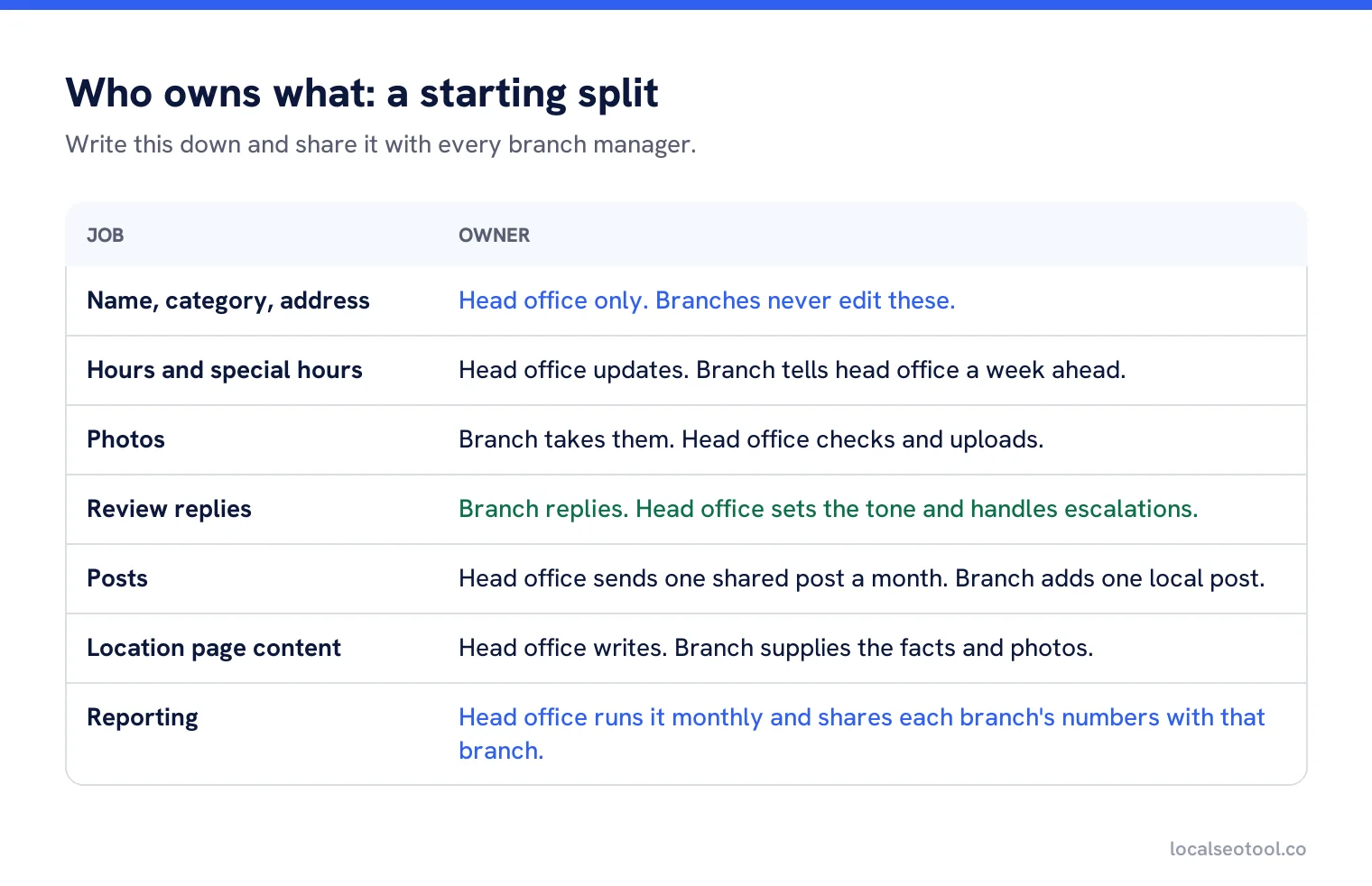
The split above is a starting point, not a rule. Some brands give branches more control, especially franchises where each owner runs their own business. What matters is that the split is written down, that each branch knows who to tell when something changes, and that head office has a way to see when a branch hasn’t done its part.
The most common gap is hours. A branch closes early for a staff training day, tells nobody at head office, and twenty customers arrive to a locked door. A simple rule fixes it: branches send any change to hours at least a week ahead, and head office updates the master record.
Mistakes that cost the most
| Mistake | What it costs | Fix |
|---|---|---|
| Every profile links to the home page | Google has no page that confirms each location | Link each profile to its own location page |
| Copy-paste location pages | Pages treated as thin or as doorway pages | Add facts only that branch can give |
| Closed branches left live | Customers sent to an empty building | Mark the profile as permanently closed and update the page |
| Branches editing their own name | Inconsistent names, suspension risk | Only head office edits names and categories |
| Average-only reporting | Weak branches hidden behind good ones | Report each branch, worst first |
| No master record | Profiles, pages and listings drift apart | One source, everything copied from it |
Where to start
If you have two to nine locations, start with layer 1 and layer 2. Get every profile verified and consistent, and give each one a real location page. Then write down who owns what. Most of the gain sits there.
If you have ten or more, start with layer 3. Build the master record and assign store codes before anything else, because every later change depends on it. Then apply for bulk verification, and set up reporting by branch so you can see which locations need attention first.
For the tools side, our comparison of tools to manage multiple Google profiles is the place to start, and franchise brands should also read franchise SEO software. Our own multi-location software puts every profile, bulk edits with a preview, one review inbox and branch-by-branch reports in one place.
Run every location from one place
Bulk edits with a preview, one review inbox, and reports for each branch. From $11.50 per location per month, three day free trial.
Frequently asked questions
Does each location need its own Google Business Profile?
Yes, if it serves customers in person during its stated hours. Each eligible location gets one profile with the same brand name, a unique store code and a link to its own location page.
Should each location have its own website?
No. Keep every location on one domain, with a page for each in a locations folder. Separate microsites split your authority and are often left out of date.
How do I avoid duplicate content on location pages?
Give each page facts only that branch can provide: directions and parking, services offered there, the team, local photos and its own reviews. Pages that only swap the town name risk being treated as doorway pages.
What is a store code in Google Business Profile?
A unique ID you give each location so bulk uploads match the right profile. Google warns that adding or changing a store code on an existing location creates a duplicate.
Who should reply to reviews for a multi-location business?
Usually the branch, because it knows what happened, with head office setting the tone and handling escalations. Write the split down so no review is left for someone else.
Sources
The Google documentation behind the guidance on this page. Google changes these pages without notice, so check the date on any figure before you rely on it.
- Guidelines for representing your business on Google
- Add and manage Business Profile store codes for bulk uploads
- Verify Business Profiles in bulk
- Import and update Business Profiles in bulk
- Create a bulk upload spreadsheet for Business Profiles
- Local Business (LocalBusiness) structured data
- Spam policies for Google web search